Good afternoon,
I am working with the Veeam Backup PowerShell toolkit and I am trying to write a script that will remove one VM from a specified backup job and add another. I can add the new VM to the job without issue but the Remove-VBRJobObject cmdlet seems to only create an exclusion for the VM that I want to remove and doesn't actually remove it from the job.
Does anyone know how I can actually REMOVE a VM from a job through the PowerShell toolkit or, as a second choice, remove an exclusion from a job through the PowerShell toolkit?
Here is the script I have so far:
$job = Get-VBRJob | where {$_.name -match "Test"}
$server = Get-VBRServer | where {$_.name -eq "esx1"}
$oldvm = Get-VBRJobObject ($job) | where {$_.name -eq "vm1"}
$newvm = "vm2"
Remove-VBRJobObject -Job ($job) -Objects ($oldvm)
Add-VBRJobObject -Job ($job) -Server ($server) -Objects ($newvm)
Thanks,
Ron Brown
-
roniva
- Novice
- Posts: 8
- Liked: never
- Joined: Apr 20, 2011 5:23 pm
- Full Name: Ron brown
- Contact:
-
Vitaliy S.
- VP, Product Management
- Posts: 27926
- Liked: 3008 times
- Joined: Mar 30, 2009 9:13 am
- Full Name: Vitaliy Safarov
- Contact:
Re: Remove-VBRJobObject
Hello Ron,
Unfortunately, there is no PowerShell cmdlet to remove VMs from backup/replication jobs. As a workaround you may want to use GetVBRJobObject cmdlet, which returns the entire list of objects added to the job. Once you have this list you can try to remove the specified object with a default method that should remove the specified object.
Hope this helps.
Unfortunately, there is no PowerShell cmdlet to remove VMs from backup/replication jobs. As a workaround you may want to use GetVBRJobObject cmdlet, which returns the entire list of objects added to the job. Once you have this list you can try to remove the specified object with a default method that should remove the specified object.
Hope this helps.
-
roniva
- Novice
- Posts: 8
- Liked: never
- Joined: Apr 20, 2011 5:23 pm
- Full Name: Ron brown
- Contact:
Re: Remove-VBRJobObject
You'll have to excuse my inexperience, but I'm not sure what the default "Delete Object" method is nor have I had any luck finding information on it online. Any information you can provide would be appreciated.
But let me tell you what my overall goal is and maybe that will help. I am trying to create a script that can help mitigate the issue (discussed elsewhere on this forum) of needing to backup the vCenter database VM through the host and not through vCenter if you want to use VSS to quiesce the database. The problem is, if the VM changes hosts, you have to modify the backup job to point to the new host. My thought was to write a script that would use the VMware PowerCLI to identify where the vCenter database VM was running and then pass that information along to the Veeam PowerShell toolkit to modify the backup job.
My first thought was to just modify the "Location" field with Set-VBRJobObject (following the examples for modifying the schedule) but the "Location" field is apparently marked "Read-Only". Then I thought to just add the new VM and remove the old, but that lead to the problem I mentioned before.
So if there are any other ideas out there to try, please let me know.
Thanks,
Ron Brown
But let me tell you what my overall goal is and maybe that will help. I am trying to create a script that can help mitigate the issue (discussed elsewhere on this forum) of needing to backup the vCenter database VM through the host and not through vCenter if you want to use VSS to quiesce the database. The problem is, if the VM changes hosts, you have to modify the backup job to point to the new host. My thought was to write a script that would use the VMware PowerCLI to identify where the vCenter database VM was running and then pass that information along to the Veeam PowerShell toolkit to modify the backup job.
My first thought was to just modify the "Location" field with Set-VBRJobObject (following the examples for modifying the schedule) but the "Location" field is apparently marked "Read-Only". Then I thought to just add the new VM and remove the old, but that lead to the problem I mentioned before.
So if there are any other ideas out there to try, please let me know.
Thanks,
Ron Brown
-
Vitaliy S.
- VP, Product Management
- Posts: 27926
- Liked: 3008 times
- Joined: Mar 30, 2009 9:13 am
- Full Name: Vitaliy Safarov
- Contact:
Re: Remove-VBRJobObject
Yes, sure. If you're familiar with PowerShell, then please execute -get help for GetVBRJobObject cmdlet, one of the methods listed in the output is the one I've been talking about.
Your idea makes perfect sense to me, however how often do you have vCenter Server migrations? I understand that I might be pushing you to use GUI on rare occasions and that is not a perfect solution in terms of automation, but it still works.
If you are able to come up with some script example after looking into GetVBRJobObject more closely and then share it with the community, It would be highly appreciated.
Your idea makes perfect sense to me, however how often do you have vCenter Server migrations? I understand that I might be pushing you to use GUI on rare occasions and that is not a perfect solution in terms of automation, but it still works.
If you are able to come up with some script example after looking into GetVBRJobObject more closely and then share it with the community, It would be highly appreciated.
-
roniva
- Novice
- Posts: 8
- Liked: never
- Joined: Apr 20, 2011 5:23 pm
- Full Name: Ron brown
- Contact:
Re: Remove-VBRJobObject
I entered the Get-Help Get-VBRJobObject command and I get the below. I'm not seeing any information on a delete method. I'm sorry if I'm missing something simple here.
As for how often the vCenter database server will migrate, yes it is not likely to happen very often. My hope was to be able to set something up so that we wouldn't miss a backup in the remote chance that it does happen to migrate for some reason. And I understand that this may be something that I'll just have to use the GUI for but should I come up with something, I'll be sure to share it with everyone.
Thanks,
Ron Brown
PS C:\Users\rbrownadm> Get-Help Get-VBRJobObject -full
As for how often the vCenter database server will migrate, yes it is not likely to happen very often. My hope was to be able to set something up so that we wouldn't miss a backup in the remote chance that it does happen to migrate for some reason. And I understand that this may be something that I'll just have to use the GUI for but should I come up with something, I'll be sure to share it with everyone.
Thanks,
Ron Brown
PS C:\Users\rbrownadm> Get-Help Get-VBRJobObject -full
Code: Select all
NAME
    Get-VBRJobObject

SYNOPSIS
    Returns a specified job.

SYNTAX
    Get-VBRJobObject [-Job] <CBackupJob> [-WarningAction <ActionPreference>] [-
    WarningVariable <String>] [<CommonParameters>]

DESCRIPTION
    Returns an object of the specified job.

PARAMETERS
    -Job <CBackupJob>
        Provide an object of the job that should be returned.

        Required?                    true
        Position?                    1
        Default value
        Accept pipeline input?       true (ByValue, ByPropertyName)
        Accept wildcard characters?  false

    -WarningAction <ActionPreference>
        Determines how the cmdlet responds to a warning from the command. "Cont
        inue" is the default value. This parameter works only when the command
        generates a warning message.
        Valid values:
        SilentlyContinue - suppresses the warning message and continues executi
        ng the command.
        Continue - displays the warning message and continues executing the com
        mand. "Continue" is the default value.
        Inquire - displays the warning message and prompts you for confirmation
         before continuing execution.
        Stop - displays the warning message and stops executing the command.

        Required?                    false
        Position?                    named
        Default value
        Accept pipeline input?       false
        Accept wildcard characters?  false

    -WarningVariable <String>
        Stores warnings about the command in the specified variable.

        Required?                    false
        Position?                    named
        Default value
        Accept pipeline input?       false
        Accept wildcard characters?  false

    <CommonParameters>
        This cmdlet supports the common parameters: Verbose, Debug,
        ErrorAction, ErrorVariable, WarningAction, WarningVariable,
        OutBuffer and OutVariable. For more information, type,
        "get-help about_commonparameters".

INPUTS

OUTPUTS

NOTES

RELATED LINKS-
Vitaliy S.
- VP, Product Management
- Posts: 27926
- Liked: 3008 times
- Joined: Mar 30, 2009 9:13 am
- Full Name: Vitaliy Safarov
- Contact:
Re: Remove-VBRJobObject
Ron, sorry for not being precise. What I was trying to say is that you can return any object and then remove it from the backup/replication job:
Code: Select all
$ob = Get-VBRJobObject
...
$o = $ob[0]
$o.Delete()-
roniva
- Novice
- Posts: 8
- Liked: never
- Joined: Apr 20, 2011 5:23 pm
- Full Name: Ron brown
- Contact:
Re: Remove-VBRJobObject
That did the trick. I was able to delete the existing entry and replace it without issue.
Thanks!
Ron Brown
And now, as promised, here is the script I wrote to identify where the vCenter Database server is running and to change the backup job to reflect the new location.
Thanks!
Ron Brown
And now, as promised, here is the script I wrote to identify where the vCenter Database server is running and to change the backup job to reflect the new location.
Code: Select all
# Note: this script needs to run as an Administrator (i.e. run with elevated rights)
# on the Veeam server and under an account that has rights to vCenter

# Add the VMware and Veeam PowerShell Snap-Ins
add-pssnapin VMware.VimAutomation.Core
add-pssnapin VeeamPSSnapIn

# Connect to the virtual center server
Connect-VIServer -Server <vCenter Server Name>

# Locate the host the vCenter database server is running on
$vmname = "<vCenter Database Server Name>"
$vmhost = Get-VMHost -VM $vmname
$servername = $vmhost.Name

# Since the resolution for the VSS issue with the vCenter database suggested connecting the hosts by IP address,
# match the host name to the IP address
switch ($servername)
{
"esx1.domain.com" {$serverip = "10.0.0.1"}
"esx2.domain.com" {$serverip = "10.0.0.2"}
"esx3.domain.com" {$serverip = "10.0.0.3"}
"esx4.domain.com" {$serverip = "10.0.0.4"}
default {Write-Warning "Host name does not match IP listed"}
}

# Remove the old server entry from the backup job
$job = Get-VBRJob | where {$_.name -match "<jobname>"}
$oldvm = Get-VBRJobObject ($job)
$oldvm.Delete()

# Add the new server entry to the backup job
$server = Get-VBRServer | where {$_.name -eq $serverip}
Add-VBRJobObject ($job) -Server ($server) -Objects ($vmname)-
Vitaliy S.
- VP, Product Management
- Posts: 27926
- Liked: 3008 times
- Joined: Mar 30, 2009 9:13 am
- Full Name: Vitaliy Safarov
- Contact:
Re: Remove-VBRJobObject
Ron, thank you very much for sharing it!
-
ThomasMc
- Veteran
- Posts: 293
- Liked: 19 times
- Joined: Apr 13, 2011 12:45 pm
- Full Name: Thomas McConnell
- Contact:
Re: Remove-VBRJobObject
I take it this is normal after the script has updated the job with the new host?
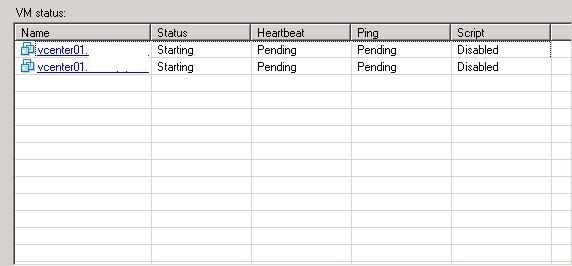
would be good if Veeam could tell that it is same VM but we can't have it all cheers for sharing Ron
would be good if Veeam could tell that it is same VM but we can't have it all
cheers for sharing Ron-
roniva
- Novice
- Posts: 8
- Liked: never
- Joined: Apr 20, 2011 5:23 pm
- Full Name: Ron brown
- Contact:
Re: Remove-VBRJobObject
I was originally looking for a way to just edit the IP address for the host but that field was read-only. So a remove and re-add was required and unfortunately that does end up making it look like a new VM.
-Ron
-Ron
-
velowulf
- Influencer
- Posts: 10
- Liked: never
- Joined: Jun 01, 2011 5:02 am
- Full Name: Paul Hutton
- Contact:
Re: Remove-VBRJobObject
I have just attempted to implement this script for a replication job but have found that once the job has been updated it fails because there is already a replica with the same name as the one that the job is trying to create. I am looking to use this script because from time to time the vcenter changes host for a number of reasons. As everybody is aware this kills the job, even if you move the server back to the original host (we use DRS).
Is there a solution to the replica name issue?
All help appreciated
Is there a solution to the replica name issue?
All help appreciated
-
Vitaliy S.
- VP, Product Management
- Posts: 27926
- Liked: 3008 times
- Joined: Mar 30, 2009 9:13 am
- Full Name: Vitaliy Safarov
- Contact:
Re: Remove-VBRJobObject
Mapping replicas into the existing VMs in the DR site is not possible with the current version (will be possible with v6), so you should remove VMs from target host's inventory prior running replication job from another host.
-
velowulf
- Influencer
- Posts: 10
- Liked: never
- Joined: Jun 01, 2011 5:02 am
- Full Name: Paul Hutton
- Contact:
Re: Remove-VBRJobObject
Yeah, I figured that would be the case and is what I ended up doing. It is a shame as I was hoping to run the above script on an automated (scheduled) basis to catch any random changes of server withour admin intervention. Roll on v6!!!  )
)
)-
astrium-fdh
- Influencer
- Posts: 11
- Liked: never
- Joined: May 06, 2010 5:56 am
- Full Name: Lutz Koop
- Contact:
Backup of vCenter
[merged]
As i know, the only way to backup the vcenter is to add the esx(i)-host on which the vcenter is running and backup the vm directly from the host.
But every time when i have to move the vcenter (for esx-updates for ex.) a have to add the vcenter again to the job because it isn't recognized any more when i moved it back.
Is there a workaround or better way
Thx
Lutz
As i know, the only way to backup the vcenter is to add the esx(i)-host on which the vcenter is running and backup the vm directly from the host.
But every time when i have to move the vcenter (for esx-updates for ex.) a have to add the vcenter again to the job because it isn't recognized any more when i moved it back.
Is there a workaround or better way
Thx
Lutz
-
Sethbartlett
- Veteran
- Posts: 282
- Liked: 26 times
- Joined: Nov 10, 2010 6:51 pm
- Full Name: Seth Bartlett
- Contact:
Re: Remove-VBRJobObject
Check out the following post I just did > HOWTO: Backing up vCenter host issues
Skype: Sethbartlett88 - Make sure to label who you are and why you want to add me 
Twitter: @sethbartlett
If my post was helpful, please like it. Sometimes twitter is quicker to hit me up if you need me.
Twitter: @sethbartlett
If my post was helpful, please like it. Sometimes twitter is quicker to hit me up if you need me.
Who is online
Users browsing this forum: No registered users and 47 guests