Case # 07960361
I have just gone to do my first file restore since the upgrade to VeeamBR 13 and the backup copies are failing to open, citing an issue with the Mount. The backups open but I'm unable to copy any files from the selected backup, the OK button is greyed out after I've select what folder I want it to go into. I also can't restore back to the original server, it times out and fails.
-
AlexLeadingEdge
- Service Provider
- Posts: 540
- Liked: 91 times
- Joined: Dec 14, 2015 9:42 pm
- Full Name: Alex Fogerty
- Contact:
-
Mildur
- Product Manager
- Posts: 12247
- Liked: 3519 times
- Joined: May 13, 2017 4:51 pm
- Full Name: Fabian K.
- Location: Switzerland
- Contact:
Re: Guest Files Restore Failed Since VeeamBR 13 Upgrade
Hi Alex
Regarding backup copies failing to open — our support team has noted that some backup files are missing. Please continue working with them so they can properly investigate the issue.
As for Copy To, it’s a documented limitation introduced with V13.
Fabian
Regarding backup copies failing to open — our support team has noted that some backup files are missing. Please continue working with them so they can properly investigate the issue.
As for Copy To, it’s a documented limitation introduced with V13.
Best,If the Veeam Backup & Replication console is launched on the backup server, the Copy to operation does not allow copying files to the backup server. You can only copy files to a network shared folder.
Fabian
Product Management Analyst @ Veeam Software
-
AlexLeadingEdge
- Service Provider
- Posts: 540
- Liked: 91 times
- Joined: Dec 14, 2015 9:42 pm
- Full Name: Alex Fogerty
- Contact:
Re: Guest Files Restore Failed Since VeeamBR 13 Upgrade
Hi Fabian,
Is that a bug or a feature?As for Copy To, it’s a documented limitation introduced with V13.
-
AlexLeadingEdge
- Service Provider
- Posts: 540
- Liked: 91 times
- Joined: Dec 14, 2015 9:42 pm
- Full Name: Alex Fogerty
- Contact:
Re: Guest Files Restore Failed Since VeeamBR 13 Upgrade
For security reasons the backup server is not a part of the domain, that way a computer virus on the domain can't destroy the backups (as recommended by Veeam!!!), so we have to save the files locally to the backup server then move them across to the domain using domain credentials. I did try the restore back to the original location using the domain credentials but it just hung and then timed out (and no cancel button so I had to wait for it to time out, thankfully there was a timeout otherwise I would have had to crash out of VeeamB&R 13).
Knowing this new limitation I was able to save the files to the backup server through the network using its UNC path name, and then copied them across to the domain. A bit painful!
Knowing this new limitation I was able to save the files to the backup server through the network using its UNC path name, and then copied them across to the domain. A bit painful!
-
Mildur
- Product Manager
- Posts: 12247
- Liked: 3519 times
- Joined: May 13, 2017 4:51 pm
- Full Name: Fabian K.
- Location: Switzerland
- Contact:
Re: Guest Files Restore Failed Since VeeamBR 13 Upgrade
Hi Alex,
This was done intentionally, so it’s not a bug.
However, we’re currently exploring options to make it possible to re-enable this feature optionally for customers who still require this functionality.
In general, there’s no need for anyone to work directly on the backup server — doing so may only increases the risk of a “computer virus” becoming active on the backup server, especially if those user accounts have local administrative permissions.
Did you have considered the approach with a dedicated management machine?
Best regards,
Fabian
This was done intentionally, so it’s not a bug.
However, we’re currently exploring options to make it possible to re-enable this feature optionally for customers who still require this functionality.
For security purposes we also recommend using a dedicated management server with the backup console installed to manage the backup server. That would immediately resolve the “Copy To” situation.For security reasons the backup server is not a part of the domain, that way a computer virus on the domain can't destroy the backups (as recommended by Veeam!!!)
In general, there’s no need for anyone to work directly on the backup server — doing so may only increases the risk of a “computer virus” becoming active on the backup server, especially if those user accounts have local administrative permissions.
Did you have considered the approach with a dedicated management machine?
Best regards,
Fabian
Product Management Analyst @ Veeam Software
-
AlexLeadingEdge
- Service Provider
- Posts: 540
- Liked: 91 times
- Joined: Dec 14, 2015 9:42 pm
- Full Name: Alex Fogerty
- Contact:
Re: Guest Files Restore Failed Since VeeamBR 13 Upgrade
No, I assume we would have to build one for each client, so that wouldn't really be practical given how many backups servers we have.Fabian wrote:Did you have considered the approach with a dedicated management machine?
Going back to the original issue, it was two different issues which complicated / compounded the situation. The second one seems to be that the backup drive I tried to restore from was a rotated drive, hence the error message about the backup file being missing. That's on me for not realising that it wasn't a read error but rather the file just wasn't there. In hindsight I should have realised that, but unfortunately I can't copy and paste the error message to check if the file was there, I'd have to try type it in manually to do a file search. Perhaps R&D could add a copy & paste feature to its pop-up error messages. That option is available by right-clicking on (non-popup) errors in VeeamB&R.
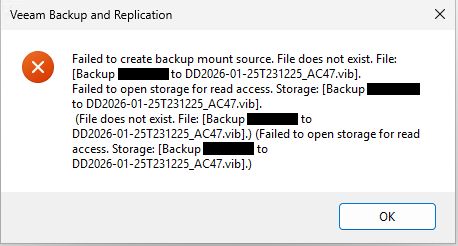
Perhaps R&D can update the error message with something a bit more meaningful? VeeamB&R knows which drives are rotated as it needs to be specified in Backup Infrastructure > Backup Repositories, perhaps it can say that the backup source is not currently available and the rotated drive may have been changed?
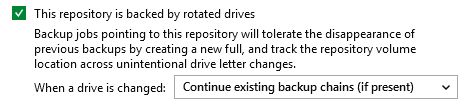
Or instead of even getting an error message, perhaps have VeeamB&R check to see if the backups currently exist when offering the list of backups to restore from, perhaps a "status" column, rather than selecting one and having it fail because the drive currently connected doesn't have the backups listed?
As an example, I've just changed the backup drive and these are the currently available backups to restore from (apparently!):
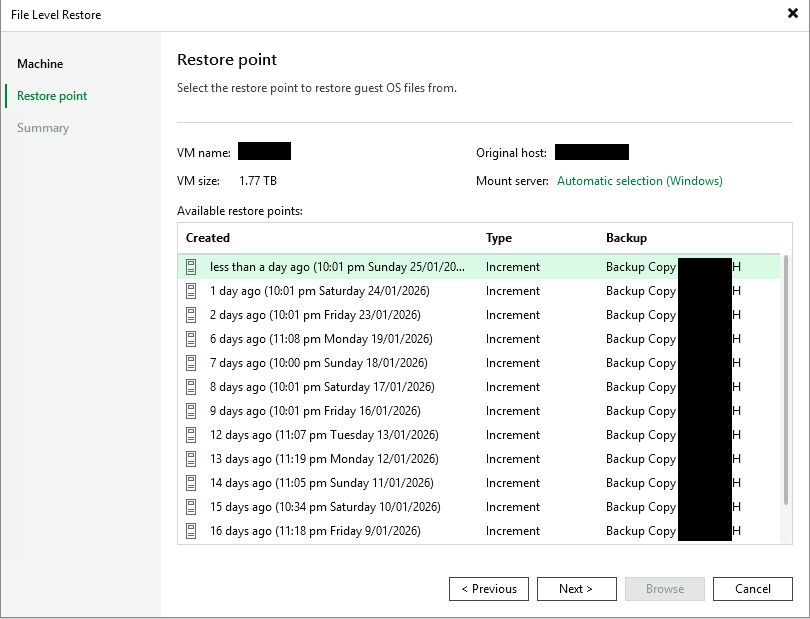
Comparing the list above to the list of actual backups below none of them are in the current restore options.
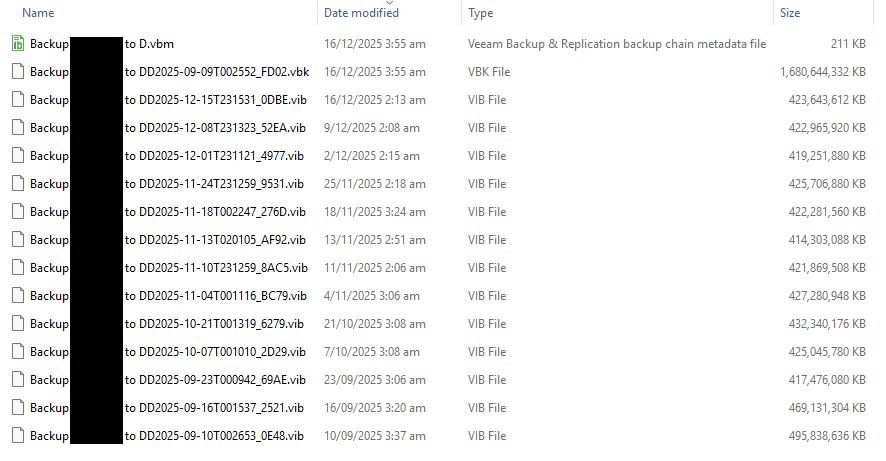
I expect this, because I had to rebuild the backup copy as it was in a legacy format that VeeamB&R 13 wouldn't / couldn't handle, but if I tried to restore any of these backup copies restore point they would all fail today because none of the listed restore points are currently available.
-
Mildur
- Product Manager
- Posts: 12247
- Liked: 3519 times
- Joined: May 13, 2017 4:51 pm
- Full Name: Fabian K.
- Location: Switzerland
- Contact:
Re: Guest Files Restore Failed Since VeeamBR 13 Upgrade
Hi Kevin,
For "Copy To":
Let’s revisit this topic once we have updates regarding possible options to enable it again.
For copying error messages:
Have you tried pressing CTRL+C on your keyboard and then CTRL+V into a text file? This should work for almost all of our error/warning messages and session detail logs.
For enhancing the error message:
I’ll make a note of it, but it wouldn’t be as simple as just adding a new text label.
For the missing backup files:
Please continue working with our Support team. We can’t start a parallel investigation here in a forum post, as we’re not Support.
Best,
Fabian
For "Copy To":
Let’s revisit this topic once we have updates regarding possible options to enable it again.
For copying error messages:
Have you tried pressing CTRL+C on your keyboard and then CTRL+V into a text file? This should work for almost all of our error/warning messages and session detail logs.
For enhancing the error message:
I’ll make a note of it, but it wouldn’t be as simple as just adding a new text label.
For the missing backup files:
Please continue working with our Support team. We can’t start a parallel investigation here in a forum post, as we’re not Support.
Best,
Fabian
Product Management Analyst @ Veeam Software
-
AlexLeadingEdge
- Service Provider
- Posts: 540
- Liked: 91 times
- Joined: Dec 14, 2015 9:42 pm
- Full Name: Alex Fogerty
- Contact:
Re: Guest Files Restore Failed Since VeeamBR 13 Upgrade
Who is Kevin? I assume this reply was for me.
-
Mildur
- Product Manager
- Posts: 12247
- Liked: 3519 times
- Joined: May 13, 2017 4:51 pm
- Full Name: Fabian K.
- Location: Switzerland
- Contact:
Re: Guest Files Restore Failed Since VeeamBR 13 Upgrade
Ups, I apologize 
Yes, I meant you, Alex.
Best,
Fabian
Yes, I meant you, Alex.
Best,
Fabian
Product Management Analyst @ Veeam Software
-
CarlosEsteves
- Enthusiast
- Posts: 87
- Liked: 10 times
- Joined: Sep 01, 2025 12:20 pm
- Full Name: Carlos Eduardo Esteves
- Location: Brazil
- Contact:
Re: Guest Files Restore Failed Since VeeamBR 13 Upgrade
Hello,
Any news on this topic ?
Any news on this topic ?
-
Mildur
- Product Manager
- Posts: 12247
- Liked: 3519 times
- Joined: May 13, 2017 4:51 pm
- Full Name: Fabian K.
- Location: Switzerland
- Contact:
Re: Guest Files Restore Failed Since VeeamBR 13 Upgrade
Hi Carlos,
Which topic are you referring to? Alex had four different topics/questions in this thread.
If you’re asking about a technical issue, please contact our customer support team and share the case number here.
Best regards,
Fabian
Which topic are you referring to? Alex had four different topics/questions in this thread.
If you’re asking about a technical issue, please contact our customer support team and share the case number here.
Best regards,
Fabian
Product Management Analyst @ Veeam Software
-
CarlosEsteves
- Enthusiast
- Posts: 87
- Liked: 10 times
- Joined: Sep 01, 2025 12:20 pm
- Full Name: Carlos Eduardo Esteves
- Location: Brazil
- Contact:
Re: Guest Files Restore Failed Since VeeamBR 13 Upgrade
Copy to to the VBR server option not available in the new version
-
Mildur
- Product Manager
- Posts: 12247
- Liked: 3519 times
- Joined: May 13, 2017 4:51 pm
- Full Name: Fabian K.
- Location: Switzerland
- Contact:
Re: Guest Files Restore Failed Since VeeamBR 13 Upgrade
No news yet, as there hasn’t been a new version released since Alex opened the topic.
I’ll provide an update once we have the option to bring the “Copy To” feature back.
Best regards,
Fabian
I’ll provide an update once we have the option to bring the “Copy To” feature back.
Best regards,
Fabian
Product Management Analyst @ Veeam Software
-
JoeNiska
- Lurker
- Posts: 2
- Liked: 1 time
- Joined: Feb 25, 2026 11:10 pm
- Full Name: JoeNiska
- Contact:
Re: Guest Files Restore Failed Since VeeamBR 13 Upgrade
We just discovered this major functionality regression while attempting to do a test restore.
Why would you removed critical functionality like this without asking customers how it would affect them, or at least making sure everyone who needed this did not install v13?
Good effing grief, we need this fixed. You've left us entirely unable to do redirected restores.
Why would you removed critical functionality like this without asking customers how it would affect them, or at least making sure everyone who needed this did not install v13?
Good effing grief, we need this fixed. You've left us entirely unable to do redirected restores.
-
david.domask
- Product Manager
- Posts: 4018
- Liked: 982 times
- Joined: Jun 28, 2016 12:12 pm
- Contact:
Re: Guest Files Restore Failed Since VeeamBR 13 Upgrade
Hi JoeNiska, welcome to the forums.
Understood on your request, as noted currently this is a limitation specifically for CopyTo the backup server; in the mean time, a network share or another server can be used as a target for CopyTo operations.
We will update the thread when we have more to share on the CopyTo feature.
Understood on your request, as noted currently this is a limitation specifically for CopyTo the backup server; in the mean time, a network share or another server can be used as a target for CopyTo operations.
We will update the thread when we have more to share on the CopyTo feature.
David Domask | Product Management: Principal Analyst
-
JoeNiska
- Lurker
- Posts: 2
- Liked: 1 time
- Joined: Feb 25, 2026 11:10 pm
- Full Name: JoeNiska
- Contact:
Re: Guest Files Restore Failed Since VeeamBR 13 Upgrade
That is NOT our experience; what we are seeing is that it is entirely impossible to effect any sort of file-level restore from the backup server.
This is major feature regression that should NOT have been made without informing customers in advance.
This is major feature regression that should NOT have been made without informing customers in advance.
-
david.domask
- Product Manager
- Posts: 4018
- Liked: 982 times
- Joined: Jun 28, 2016 12:12 pm
- Contact:
Re: Guest Files Restore Failed Since VeeamBR 13 Upgrade
If you are seeing different behavior than is listed in the linked User Guide, please open a Support Case and allow Veeam Support to review the behavior. As noted in the previous posts and the linked User Guide, the functionality is meant to limit Copy To as a target to the Backup Server itself.
David Domask | Product Management: Principal Analyst
-
mengl
- Service Provider
- Posts: 27
- Liked: 19 times
- Joined: Oct 19, 2018 7:02 am
- Full Name: Michael Engl
- Location: Germany
- Contact:
Re: Guest Files Restore Failed Since VeeamBR 13 Upgrade
A customer came to me with this issue that days.
Then Support told me
First, the user experience is poor. It looks like a bug and only causes unnecessary problems during a restore (which is exactly when it’s usually urgent). If that is the intention, the dialog should also indicate that the user needs to select a different folder
Second, it can easily be circumvented using the described workaround or by opening the file in Explorer - so the change adds zero value in terms of security
Third, in the event of a disaster, it should be easy to access a file with as few external dependencies as possible
Please treat this as "feature" request to add this back.
Then Support told me
I am completely dissatisfied with this changeStarting with Veeam Backup & Replication v13, the "Copy to" option in Windows File Level Recovery does not allow copying files directly to the backup server’s local drives (such as C: or D:) when the Veeam Backup & Replication console is launched on the backup server. This is by design, and as a result, the "OK" button will remain greyed out if a local drive is selected as the destination.
To resolve this and enable the "OK" button, please select a network shared folder as your destination. For example, you can use a UNC path such as "\\localhost\c$\test" or any other accessible network share. This will allow you to proceed with the "Copy to" operation
First, the user experience is poor. It looks like a bug and only causes unnecessary problems during a restore (which is exactly when it’s usually urgent). If that is the intention, the dialog should also indicate that the user needs to select a different folder
Second, it can easily be circumvented using the described workaround or by opening the file in Explorer - so the change adds zero value in terms of security
Third, in the event of a disaster, it should be easy to access a file with as few external dependencies as possible
Please treat this as "feature" request to add this back.
-
apolloxm
- Expert
- Posts: 126
- Liked: 12 times
- Joined: Aug 27, 2021 12:29 am
- Contact:
Re: Guest Files Restore Failed Since VeeamBR 13 Upgrade
Please treat this as "feature" request to add this back.
-
Mildur
- Product Manager
- Posts: 12247
- Liked: 3519 times
- Joined: May 13, 2017 4:51 pm
- Full Name: Fabian K.
- Location: Switzerland
- Contact:
Re: Guest Files Restore Failed Since VeeamBR 13 Upgrade
Hi all,
Great news: with V13.1, we have added a new registry key to bring this functionality back.
The key is only valid for Windows-based backup servers. It won’t have any effect on Linux-based VSA.
No service or console restart is required. Set the key, and the next time you select Copy To during File Level Restore, you can select a local disk again.
Fabian
Great news: with V13.1, we have added a new registry key to bring this functionality back.
The key is only valid for Windows-based backup servers. It won’t have any effect on Linux-based VSA.
No service or console restart is required. Set the key, and the next time you select Copy To during File Level Restore, you can select a local disk again.
Best,Windows-based Veeam Backup & Replication Deployment only, add this registry value:
Key Location: HKLM\SOFTWARE\Veeam\Veeam Backup and Replication\
Value Name: FlrAllowLocalCopyTo
Value Type: DWORD (32-Bit) Value
Value Data: 1
Fabian
Product Management Analyst @ Veeam Software
-
CarlosEsteves
- Enthusiast
- Posts: 87
- Liked: 10 times
- Joined: Sep 01, 2025 12:20 pm
- Full Name: Carlos Eduardo Esteves
- Location: Brazil
- Contact:
Re: Guest Files Restore Failed Since VeeamBR 13 Upgrade
That is a very good news. Any idea when the new version will be released ?
-
Mildur
- Product Manager
- Posts: 12247
- Liked: 3519 times
- Joined: May 13, 2017 4:51 pm
- Full Name: Fabian K.
- Location: Switzerland
- Contact:
Re: Guest Files Restore Failed Since VeeamBR 13 Upgrade
Product Management Analyst @ Veeam Software
-
CarlosEsteves
- Enthusiast
- Posts: 87
- Liked: 10 times
- Joined: Sep 01, 2025 12:20 pm
- Full Name: Carlos Eduardo Esteves
- Location: Brazil
- Contact:
Re: Guest Files Restore Failed Since VeeamBR 13 Upgrade
I see only Veeam Appliance 13.1
-
Mildur
- Product Manager
- Posts: 12247
- Liked: 3519 times
- Joined: May 13, 2017 4:51 pm
- Full Name: Fabian K.
- Location: Switzerland
- Contact:
Re: Guest Files Restore Failed Since VeeamBR 13 Upgrade
Both (Windows + VSA) are available in the link provided in the forum topic.
Here is a direct link to the correct tab.

Best,
Fabian
Here is a direct link to the correct tab.
Best,
Fabian
Product Management Analyst @ Veeam Software
-
mengl
- Service Provider
- Posts: 27
- Liked: 19 times
- Joined: Oct 19, 2018 7:02 am
- Full Name: Michael Engl
- Location: Germany
- Contact:
Re: Guest Files Restore Failed Since VeeamBR 13 Upgrade
Thanks for listening to our feedback.
The registry key is working as expected.
The registry key is working as expected.
Who is online
Users browsing this forum: No registered users and 20 guests