Hello,
We are currently testing VBR with our Proxmox infrastructure but we're running into several issues due to hardcoded 'legacy IPv4' limitations in the GUI as well as on the data plan.
Our insfrastructure is consists of a physical remote Veeam BR 12.3.2.4165 server, reachable over IPv6 (GUA) alongside an internal test Proxmox host, with a dual stack IPv4/IPv6 network setup, with an IPv6 GUA address. On the firewall side, the required ports are open to allow communication between each IPv6 address. However, we've run into several issues / limitations, notably :
1. Inability to add the Proxmox host using the IPv6 address
Veeam can reach the server, the SSH key is obtained

But it fails due to an 'invalid port specified' :

Assiging an DNS AAAA record to the Proxmox host and then adding it works
2. Veeam can deploy the agent but the latter cannot communicate because it's hardcoded to use legacy IPv4
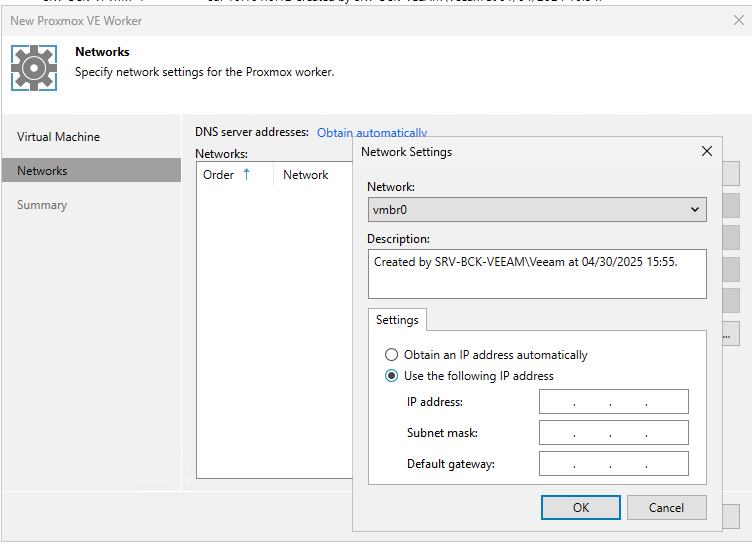
DHCP is enabled on the Worker config on the Veeam GUI but the VM does not obtain a SLAAC address
Documented here but never resolved :
post546848.html?hilit=ipv6#p546848

IPv6 on the worker's network config appears to have been intentionally disabled, proxmox reports no IPv6 address on the VM :

So in essence, the data plan communication between the agent and host over IPv6 does not work.
There is no article mentioning such limitations other than the generic advertised IPv6 support here :
https://helpcenter.veeam.com/docs/vbr/u ... tml?ver=13
"Veeam Backup & Replication supports IPv6 communication for all backup infrastructure components" but this is clearly not the case
Is this fixed in VBR 13 or do you plan to implement it ?
Thanks

 . We deprecated v4 in our infrastructure a few years ago, and run full v6 as of now.