Hello,
I need to use the principe of least privileges on my customer and I would like to know more about what veeam needs because on documentation it's always global admin or product admin (exchange / sharepoint /...).
I'm implementing the restore portal and I want my administrator to connect on it but I would like to know if it's possible to work without exchange admin role and if yes, what is exactly needed ?
Same question for Onedrive
Thanks
-
matteu
- Veeam Legend
- Posts: 980
- Liked: 160 times
- Joined: May 11, 2018 8:42 am
- Contact:
-
Bjoern_ch
- Service Provider
- Posts: 90
- Liked: 30 times
- Joined: Sep 09, 2022 12:22 pm
- Full Name: Bjoern
- Location: Zurich
- Contact:
Re: Principle of least privileges
if you just use the restore portal then no GA or Exchange/SP/Teams Admin needed.
For restore portal you set permissions in vbo. Just create a restore operator role for your customers admin and define the scope. But if you want to access your customers data via restore portal then you would need an account (no permissions needed) in their tenant.
GA or the level below is only required for restore via Explorers.
If you provide explorers via cloud connect to your customers then GA is required for restore.
For restore portal you set permissions in vbo. Just create a restore operator role for your customers admin and define the scope. But if you want to access your customers data via restore portal then you would need an account (no permissions needed) in their tenant.
GA or the level below is only required for restore via Explorers.
If you provide explorers via cloud connect to your customers then GA is required for restore.
-
matteu
- Veeam Legend
- Posts: 980
- Liked: 160 times
- Joined: May 11, 2018 8:42 am
- Contact:
Re: Principle of least privileges
Thanks for your answer
ok, so I probably have an issue I need to solve on my current support ticket...
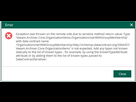
With my test account (on the customer tenant) there is no cloud connect, I can login on the restore portal fine and see I'm restore operator but when I click on "you" to select an other user, I have an error message.
I don't have error message with an other user global admin.
I will do some more test and wait for support help
Case 07957716
Good to know permission needed are different.
Web restore portal = Veeam RBAC permission needed only
Console = Administrator / Global admin if using account + password authentication or application permission if using cert based authentication right ?
For cert based authentication, you can use what cert you want or you need to use the cert created with azure application ?
ok, so I probably have an issue I need to solve on my current support ticket...
With my test account (on the customer tenant) there is no cloud connect, I can login on the restore portal fine and see I'm restore operator but when I click on "you" to select an other user, I have an error message.
I don't have error message with an other user global admin.
I will do some more test and wait for support help
Case 07957716
Good to know permission needed are different.
Web restore portal = Veeam RBAC permission needed only
Console = Administrator / Global admin if using account + password authentication or application permission if using cert based authentication right ?
For cert based authentication, you can use what cert you want or you need to use the cert created with azure application ?
-
Bjoern_ch
- Service Provider
- Posts: 90
- Liked: 30 times
- Joined: Sep 09, 2022 12:22 pm
- Full Name: Bjoern
- Location: Zurich
- Contact:
Re: Principle of least privileges
What error message do you have?
If a restore operator role is not working as expected my first step would be to create the role again. For us, this often helped in the past. If the operator scope was assigned to a group it also helped in the past to assign it directly to a user instead when there were issues.
for cert based authentication you must use the cert used with the azure application (you can change it and upload another one if you like)
If a restore operator role is not working as expected my first step would be to create the role again. For us, this often helped in the past. If the operator scope was assigned to a group it also helped in the past to assign it directly to a user instead when there were issues.
for cert based authentication you must use the cert used with the azure application (you can change it and upload another one if you like)
-
matteu
- Veeam Legend
- Posts: 980
- Liked: 160 times
- Joined: May 11, 2018 8:42 am
- Contact:
Re: Principle of least privileges
This is the error message

-
matteu
- Veeam Legend
- Posts: 980
- Liked: 160 times
- Joined: May 11, 2018 8:42 am
- Contact:
Re: Principle of least privileges
There is no error if I set the user RestoreOperator1 has as included object a user but as soon as I select a group it doesn't work.
It's the same group I use as my backup job like GRP_USER_SITE1 (Azure dynamic group)
It's the same group I use as my backup job like GRP_USER_SITE1 (Azure dynamic group)
-
Bjoern_ch
- Service Provider
- Posts: 90
- Liked: 30 times
- Joined: Sep 09, 2022 12:22 pm
- Full Name: Bjoern
- Location: Zurich
- Contact:
Re: Principle of least privileges
ok, never seen that error before.
When it`s not working with a group assignment switch to direct assignment of a user. We have this issue with several customers as well but as the user assignment is working we do not mind.
You should be aware that the group is not dynamically updated within veeam. I think the restore operator group is updated every hour.
You can manually sync with Start-VBOOrganizationSynchronization
When it`s not working with a group assignment switch to direct assignment of a user. We have this issue with several customers as well but as the user assignment is working we do not mind.
You should be aware that the group is not dynamically updated within veeam. I think the restore operator group is updated every hour.
You can manually sync with Start-VBOOrganizationSynchronization
-
matteu
- Veeam Legend
- Posts: 980
- Liked: 160 times
- Joined: May 11, 2018 8:42 am
- Contact:
Re: Principle of least privileges
Thanks for your answer.
It s 8 differents role of restore operator with 8 differents azure dynamic group.
Each group is arround 200 to 500 users
It s not possible to play to add user manually here ^^ . I m using domain mail name on each group.
The configuration was done several days ago ^^
I will wait support answer but to be honest it s a little slow unfortunately...
It s 8 differents role of restore operator with 8 differents azure dynamic group.
Each group is arround 200 to 500 users
It s not possible to play to add user manually here ^^ . I m using domain mail name on each group.
The configuration was done several days ago ^^
I will wait support answer but to be honest it s a little slow unfortunately...
-
matteu
- Veeam Legend
- Posts: 980
- Liked: 160 times
- Joined: May 11, 2018 8:42 am
- Contact:
Re: Principle of least privileges
Support confirmed it s unexpected behavior and escalate to R&D
-
matteu
- Veeam Legend
- Posts: 980
- Liked: 160 times
- Joined: May 11, 2018 8:42 am
- Contact:
Re: Principle of least privileges
Support provided me a fix.
It s working fine now
It s working fine now
Who is online
Users browsing this forum: No registered users and 13 guests