With "File Level Restore" of Veeam Agent I'm restoring a user folder (C:\Users\%InsertUsernameHere%) into a different machine, with "File overwrite" procedure. Suboptimal I know, but this is what I'm currently doing.
Every time that some file cannot be copied for reasons (no matter currently) I have to pick a "Yes" or "No" for allowing procedure to complete.
There's no way to say "this is my answer, is a bad idea but i would love that you continue restoring all files", even producing a txt report specifically accessible.
Is possible to implement that?
-
azpets
- Enthusiast
- Posts: 54
- Liked: 13 times
- Joined: Dec 05, 2020 4:08 pm
- Full Name: A.Z. SRL
- Contact:
-
Dima P.
- Product Manager
- Posts: 15049
- Liked: 1900 times
- Joined: Feb 04, 2013 2:07 pm
- Full Name: Dmitry Popov
- Location: Prague
- Contact:
Re: [Improvement] Checkbox for "always yes" or "always no" into file restore procedure
Hello azpets,
Have you tried the option to perform recovery with overwrite enabled from the start? Thank you!
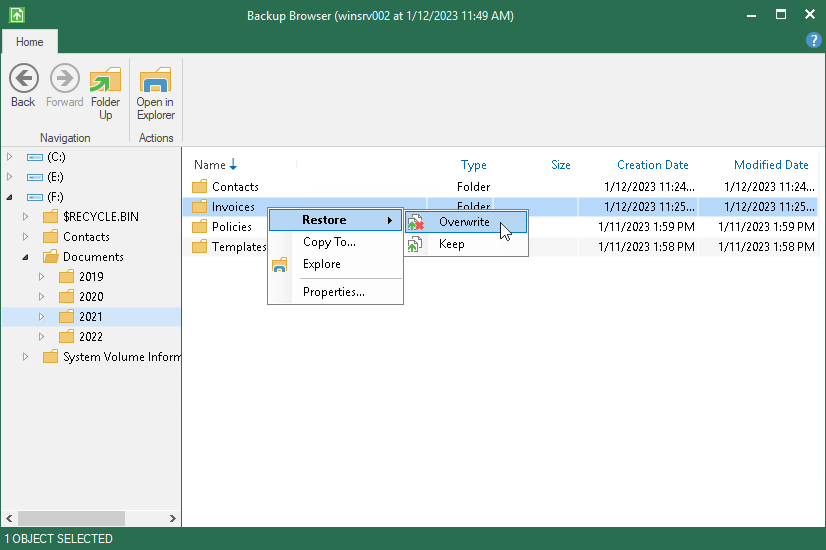
Have you tried the option to perform recovery with overwrite enabled from the start? Thank you!
-
edvdave
- Novice
- Posts: 8
- Liked: never
- Joined: Sep 24, 2018 11:14 am
- Full Name: edvdave
- Contact:
Re: [Improvement] Checkbox for "always yes" or "always no" into file restore procedure
copy to - fails because of "too long paths" especially profile folders with long paths in appdata. "copy to" does miss the feature "always yes".
because sometimes you dont want to overwrite profiles.i just want to restore a profile to a different folder.
same bug as OP
because sometimes you dont want to overwrite profiles.i just want to restore a profile to a different folder.
same bug as OP
-
edvdave
- Novice
- Posts: 8
- Liked: never
- Joined: Sep 24, 2018 11:14 am
- Full Name: edvdave
- Contact:
Re: [Improvement] Checkbox for "always yes" or "always no" into file restore procedure
is overwrite even a valid option, if the new computer does not have the same folder structures and partitions?
-
edvdave
- Novice
- Posts: 8
- Liked: never
- Joined: Sep 24, 2018 11:14 am
- Full Name: edvdave
- Contact:
Re: [Improvement] Checkbox for "always yes" or "always no" into file restore procedure
Well, restore function is completely broken at that point.
Restore of whole volume not possible, due to the lack of that partitions on the new device.
I was able to recover the data with the "right-click Explorer" option. So the Backup gets mounted inside the Windows Explorer.
From there i could copy using the Windows File Explorer. Really disappointing the builtin Veeam File Recovery Browser in broken in recent Win11 25H2
Restore of whole volume not possible, due to the lack of that partitions on the new device.
I was able to recover the data with the "right-click Explorer" option. So the Backup gets mounted inside the Windows Explorer.
From there i could copy using the Windows File Explorer. Really disappointing the builtin Veeam File Recovery Browser in broken in recent Win11 25H2
Who is online
Users browsing this forum: No registered users and 55 guests