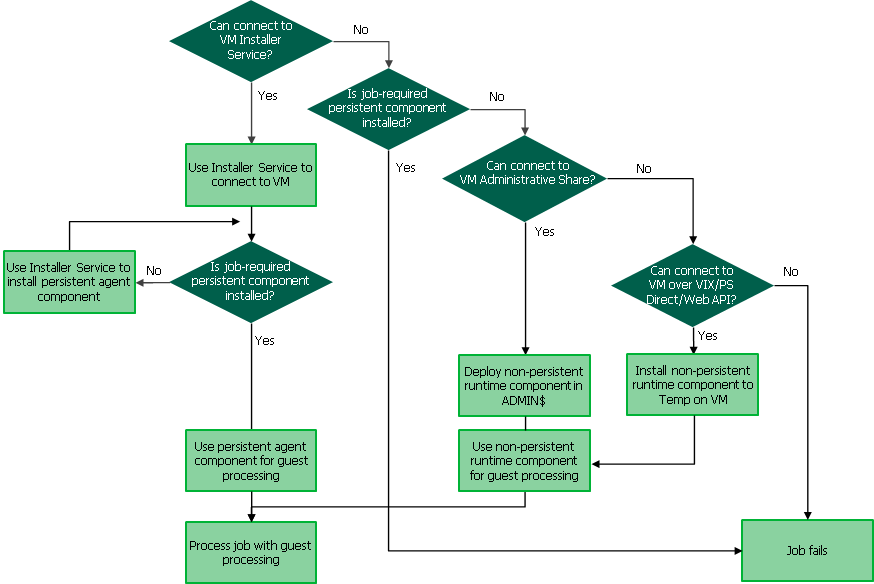
Surely "Is job-required persistent component installed?" = Yes, should link to "Use persistent agent component for guest processing", not "Job fails"?

That sound strange. Maybe you can open a case and have our support team check the logs.I've got an issue in production now where the persistent agent being installed isn't enough - and it refuses to work. It seems to require access to admin$ - even though the agent is already there for it to talk to.
I did install the installer service as perRegnor wrote: Dec 08, 2022 9:47 am Have you installed the Veeam Installer Service on the VM? And if you're not using the built-in Administrator, you'll have to set the LocalAccountTokenFilterPolicy registry key.
and I'm using the .\Administrator account (magic SID) - but that account always gets access denied (wrong password) in VBR but works fine in net use etc I've reentered the password into VBR multiple times, this is not the the issue. I've not set, and should not need, LocalAccountTokenFilterPolicy.
ThanksMildur wrote: Dec 09, 2022 8:49 am I'll ask our tech writers to have a look at this page in the user guide.
So the image is wrong, and I'm not going madMildur wrote: Dec 09, 2022 8:49 am If install service doesn't answer, but the persistent guest agent does, it should work. Also talked to one of my colleagues this morning and it should work.

When I've finished my VMCE training (thanks Veeam!), I'll open a case with support to investigate. I know I messed up the persistent agent install manually as I didn't copy / create the config file. I don't think there's any / supported way to get this config and manually install the agent (not rely on installer service, which didn't work).Mildur wrote: Dec 09, 2022 8:49 am That sound strange. Maybe you can open a case and have our support team check the logs.

You only have to install only the installer service by one of the mentioned methods in our user guide.I know I messed up the persistent agent install manually as I didn't copy / create the config file. I don't think there's any / supported way to get this config and manually install the agent (not rely on installer service, which didn't work).
Enjoyhen I've finished my VMCE training (thanks Veeam!), I'll open a case with support to investigate.

Have you also tried to use HOSTNAME\Administrator?AlexHeylin wrote: Dec 09, 2022 1:12 pm and I'm using the .\Administrator account (magic SID) - but that account always gets access denied (wrong password) in VBR but works fine in net use etc I've reentered the password into VBR multiple times, this is not the the issue. I've not set, and should not need, LocalAccountTokenFilterPolicy.
It may be "correct" - but it seems to also be wrong, because both you and I have demonstrated that what the diagram says (Persistent Agent Installed = Yes -> Immediate Job Fail) is not what happens. At the very least, it attempts to connect to the admin$ share (which is documented as only happening if Persistent Agent Installed = No. Something seems to smell here - I don't know if it's docs, code, or logic - but there's an aroma in the air.Mildur wrote: Dec 09, 2022 2:03 pm Unfortunately the user guide is correct. Technical writers confirmed it with our QA. I also run a short test in my lab.
If you remove the installer service, the job will fail.
I agree - that's what I'm seeing in production.Mildur wrote: Dec 09, 2022 2:03 pm But I'm still confused by the screenshot in the user guide. I'll continue to work with our technical writers. Fallback to admin share at the second last line in my session details is not documented in our user guide.
I'm going to try removing the agent and installer service, then ensure I install the installer as per guide. However, given the point of this (in this instance) is to avoid dealing with the admin$ refusing valid credentials - I found installing the installer service did not help, and it still complained about credentials. It's like those creds are valid unless Veeam uses them. They work perfectly for everything else includingMildur wrote: Dec 09, 2022 2:03 pm You only have to install only the installer service by one of the mentioned methods in our user guide.
The persistent guest agent components will be deployed over port 6160 to the installer service the first time the backup job runs. Admin$ is not required to deploy the persistent components.
Code: Select all
net use z: \\vmname\admin$ /user:administratorI have tried that. Unfortunately VBR still says username and password wrong (error 5 and 1326).
Code: Select all
Cannot connect to the admin share. Host: [VMNAME]. Account: [.\Administrator].;Unable to establish connection via the admin share [b]because the guest agent is available[/b];


I have received a reply from QA because I asked them exactly about this behavior.It may be "correct" - but it seems to also be wrong, because both you and I have demonstrated that what the diagram says (Persistent Agent Installed = Yes -> Immediate Job Fail) is not what happens. At the very least, it attempts to connect to the admin$ share (which is documented as only happening if Persistent Agent Installed = No. Something seems to smell here - I don't know if it's docs, code, or logic - but there's an aroma in the air.
Code: Select all
Unable to establish connection via the admin share because the guest agent is availableUsers browsing this forum: No registered users and 39 guests