Hi Everyone,
Background: Backup Copy Job containing multiple VMs to offsite SOBR using placement policy: increments (VIB) to one location and full backups (VBK) to another.
Scenario: Copy job fails part way through transfer leaving incomplete restore points.
Problem: to fix this you need to identify the corrupt files in the SOBR location. Manually delete and then forget them from the Database in order to allow the copy job to run again without errors. This is not straight forward to do and the GUI is not intuitive.
As it stands you can open the properties of the Disk (Copy) job and click on a VM in the top left of the window and then see both the restore points and their status i.e. incomplete in the top right window and below that a list of all the related files. The fundamental problem is there is no correlation between the two in the GUI. Clicking on an incomplete Restore Point does not highlight the corresponding file. Further the Files window lists not the creation time which would map to the Restore point time. Instead files shows the completion time whilst restore point shows the start time. Given that a job may run for hours and often from late night to early morning neither date nor time will match the restore point. If there are retries you might see multiple files for similar dates and times and no way of knowing which is which unless there is an obvious size discrepancy (i.e. a 0 byte file or a low MB file when all others are multiple GB files)
Feature request:
In the Backup Properties window for Backups > Disk (Copy) (and Disk), provide a clear, direct mapping between each restore point and its underlying backup file(s). For example:
○ A column showing the exact file name (.vbk / .vib) per restore point.
○ Or a details pane that explicitly lists:
○ File name
○ Repository / SOBR extent
○ File size
○ File timestamp
○ Optionally, a button like “Open in Files view” that jumps directly to that file in the repository Files browser.
This would:
○ Remove ambiguity when job times and file times differ.
○ Make it easier to identify incomplete or problematic increments/fulls.
○ Help in multi‑VM backup copy jobs and per‑VM chains.
-
NickKulkarni
- Enthusiast
- Posts: 40
- Liked: 9 times
- Joined: Feb 08, 2021 6:11 pm
- Full Name: Nicholas Kulkarni
- Contact:
-
david.domask
- Product Manager
- Posts: 4079
- Liked: 995 times
- Joined: Jun 28, 2016 12:12 pm
- Contact:
Re: Feature Request: Show underlying backup file name per restore point in Backup Properties (Disk (Copy))
Hi NickKulkarni,
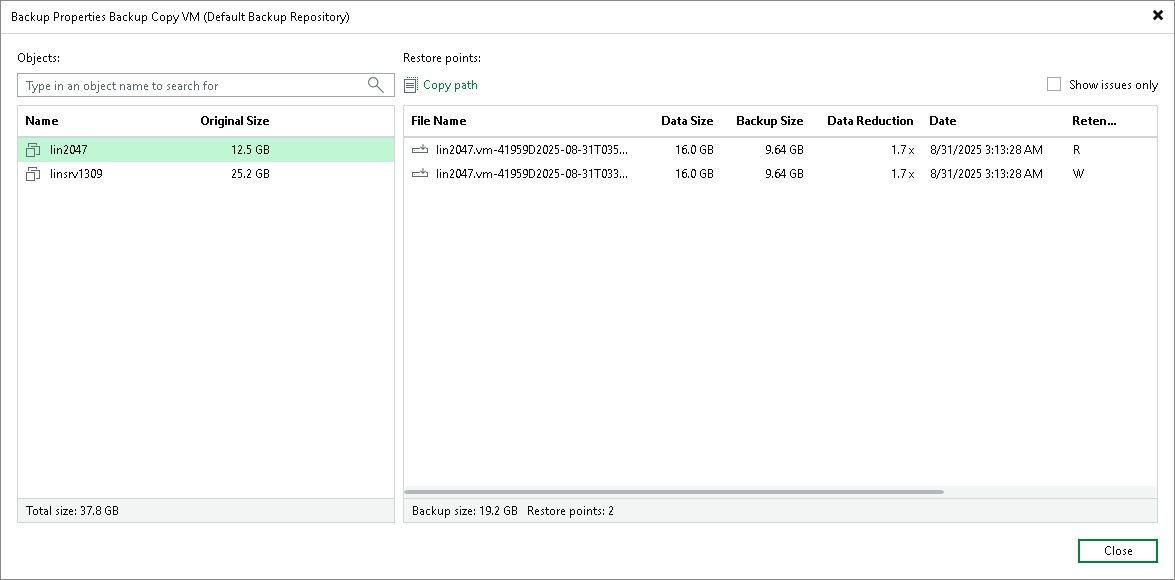
You can also right-click an individual backup file for a selected workload and get the same option.
For the remainder of your request, understood on the extent part, and there are Script Solutions for this (should still work on v13).
Similarly, can you please clarify on your use of "Incomplete" -- incomplete means just that, the restore point is not a complete representation of the state of the machine at that specific time, but Incomplete =/= corrupt, it just means that recoverability will be limited to what was included in the restore point. That is to say, these are usable and valid points, and removing them manually will impact recoverability from subsequent incremental restore points that depend on that restore point.
Is it really about points marked as incomplete? As with those, retrying the job or simply starting an incremental run will create a new restore incremental point that is complete, but maybe you mean something else besides incomplete.
Doesn't the "Copy Path" button help with this one? Exactly to the right of the Search box:○ A column showing the exact file name (.vbk / .vib) per restore point.
You can also right-click an individual backup file for a selected workload and get the same option.
For the remainder of your request, understood on the extent part, and there are Script Solutions for this (should still work on v13).
Similarly, can you please clarify on your use of "Incomplete" -- incomplete means just that, the restore point is not a complete representation of the state of the machine at that specific time, but Incomplete =/= corrupt, it just means that recoverability will be limited to what was included in the restore point. That is to say, these are usable and valid points, and removing them manually will impact recoverability from subsequent incremental restore points that depend on that restore point.
Is it really about points marked as incomplete? As with those, retrying the job or simply starting an incremental run will create a new restore incremental point that is complete, but maybe you mean something else besides incomplete.
David Domask | Product Management: Principal Analyst
Who is online
Users browsing this forum: andre.simard, Bing [Bot], DuckDuckGo [Bot], Google [Bot] and 35 guests