sometimes you decide to go a different way and possibly would like to change the subdirectory where VM-backups are located. In case of Hardened Repositories or Linux Repositories it would be easier, if you could not only create subdirectories, but also delete old ones no longer used.
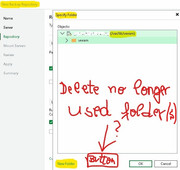
Maybe you would like to create another subdirectory with a different name parallel to another older used subdirectory, but unfortunately it's not possible to delete empty subdirectories in the backup repository dialogue. Instead, you to need to logon to the console of e.g. a Hardened Repository system and use the command line to delete no longer used subdirectories.
We wished there would be a button available in the following dialogue, when browsing /var/lib/veeam ...
Thank you for your attention.