The VM deploys correctly to the VME cluster and responds to pings, but it ultimately fails.
Any ideas?
"Failed to connect to the worker core service: A credentials tag cannot be null or empty"
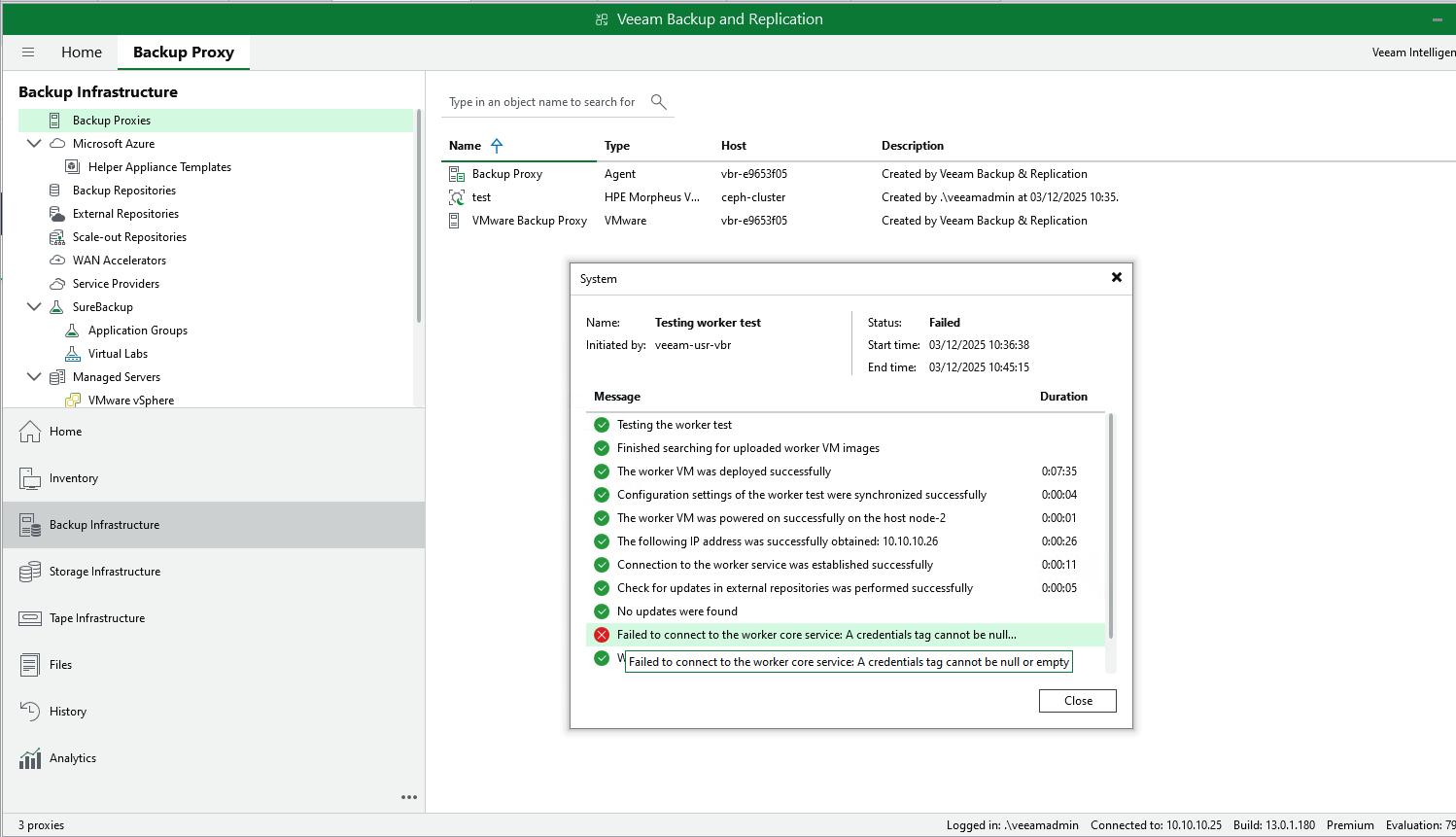
I see the same error in your logs that Evgeny mentioned:

Code: Select all
Successfully found the custom service plan "veeam-custom-service-plan" 40
Failed to deploy the worker VM: Object reference not set to an instance of an object.: System.NullReferenceException: Object reference not set to an instance of an object.
   at Veeam.PlatformService.BackupRestore.Workers.HpeSpecificWorkerManager.CreateWorkerInstanceAsync(BackupWorker worker, HpeRestClient restClient, VmAffinity affinity, Int64 imageId
   at Veeam.PlatformService.BackupRestore.Workers.HpeSpecificWorkerManager.DeployWorkerInstanceAsync(BackupWorker worker, String imageId, VmAffinity affinity, String cloudInitConfigY
   at Veeam.Vbf.WorkerManagement.WorkerManagers.WorkerManager.<>c__DisplayClass136_0.<<DeployVirtualMachineAsync>b__2>d.MoveNext()
--- End of stack trace from previous location ---
   at Veeam.Vbf.TaskManagement.Extensions.ProgressReporterExtensions.PerformAsync[T](IProgressReporterBase reporter, ILogger logger, String startMessage, Func`2 successMessage, Func`
172/api/serviceSessions/b9d8a41b-aa95-4810-933a-b64abb99eb56", headers: "[Authorization: ***, x-api-version: 1.0-rev46]", cookies: "[]", body: "{"status":"InProgress","id":"b9d8a41b-
Changed "worker VME-Worker, eabddd88-851c-479f-810c-64fb61f14d4c" state from Preparing to Configured
Save worker eabddd88-851c-479f-810c-64fb61f14d4c data to DB
172/api/workers/eabddd88-851c-479f-810c-64fb61f14d4c", headers: "[Authorization: ***, x-api-version: 1.0-rev46]", cookies: "[]", body: "{"name":"VME-Worker","tag":{"value":"eabddd88-
6172/api/workers/eabddd88-851c-479f-810c-64fb61f14d4c", "code: 200", duration: "27 msec", headers: "[]", cookies: "[]", body: "{"name":"VME-Worker","tag":{"value":"eabddd88-851c-479f
arting the OnTaskFinished operation. Result: GeneralError
nished the task: State: Finished, result: Error
ll continuations...
4fb61f14d4c "VME-Worker" to failed workers since its test session failed
Worker VME-Worker test failed: Object reference not set to an instance of an object.
ntinuations have been executedCode: Select all
2026-01-30 11:21:29.8828 00007 [13428] ERROR | [Worker][8660f4bd-84f6-455b-a577-43a86ff5ca1d][HD-VeeamWorker]: Failed to deploy the worker. ID 24, name: "HD-VeeamWorker": Veeam.Vbf.Common.Exceptions.ExceptionWithDetail: Failed to deploy the instance 24: Failed to create server
2026-01-30 11:21:29.8828 00007 [13428] ERROR | [Worker][8660f4bd-84f6-455b-a577-43a86ff5ca1d][HD-VeeamWorker]:    at Veeam.HpeMorpheusVmeBackup.RestClient.Client.HpeRestClientExtensions.EnsureInstanceHasStatusAsync(HpeRestClient restClient, Int64 instanceId, InstanceStatus status, CancellationToken cancellationToken)
2026-01-30 11:21:29.8828 00007 [13428] ERROR | [Worker][8660f4bd-84f6-455b-a577-43a86ff5ca1d][HD-VeeamWorker]:    at Veeam.PlatformService.BackupRestore.Workers.HpeSpecificWorkerManager.DeployWorkerInstanceAsync(BackupWorker worker, String imageId, VmAffinity affinity, String cloudInitConfigYaml, CancellationToken cancellationToken)
2026-01-30 11:21:29.8828 00007 [13428] DEBUG | [Morpheus][VME-MANAGER][49b560a2-dc9a-4fcc-a688-fbed2ad8c7e8]:  <== Request "Delete" "https://172.20.139.20/api/instances/24?force=on", headers: "[Authorization: ***]", cookies: "[XSRF-TOKEN: ***]", body: "{}"
2026-01-30 11:21:30.0352 00007 [13428] DEBUG | [Morpheus][VME-MANAGER][49b560a2-dc9a-4fcc-a688-fbed2ad8c7e8]:  ==> Response "Delete" "https://172.20.139.20/api/instances/24?force=on", "code: 200", duration: "147 msec", headers: "[Transfer-Encoding: chunked, Feature-Policy: vibrate 'none' ; microphone * ; camera 'none' ; gyroscope 'none' ; magnetometer 'none' ; geolocation 'none' ; midi 'self' ; notifications 'self' ; push 'self' ; sync-xhr 'self']", cookies: "[]", body: "{"success":true}"
2026-01-30 11:21:30.0382 00007 [13428] ERROR | [Worker][8660f4bd-84f6-455b-a577-43a86ff5ca1d][HD-VeeamWorker]: Failed to deploy the worker VM: Failed to deploy the instance 24: Failed to create server: Veeam.Vbf.Common.Exceptions.ExceptionWithDetail: Failed to deploy the instance 24: Failed to create server
2026-01-30 11:21:30.0382 00007 [13428] ERROR | [Worker][8660f4bd-84f6-455b-a577-43a86ff5ca1d][HD-VeeamWorker]:    at Veeam.HpeMorpheusVmeBackup.RestClient.Client.HpeRestClientExtensions.EnsureInstanceHasStatusAsync(HpeRestClient restClient, Int64 instanceId, InstanceStatus status, CancellationToken cancellationToken)
2026-01-30 11:21:30.0382 00007 [13428] ERROR | [Worker][8660f4bd-84f6-455b-a577-43a86ff5ca1d][HD-VeeamWorker]:    at Veeam.PlatformService.BackupRestore.Workers.HpeSpecificWorkerManager.DeployWorkerInstanceAsync(BackupWorker worker, String imageId, VmAffinity affinity, String cloudInitConfigYaml, CancellationToken cancellationToken)
2026-01-30 11:21:30.0382 00007 [13428] ERROR | [Worker][8660f4bd-84f6-455b-a577-43a86ff5ca1d][HD-VeeamWorker]:    at Veeam.PlatformService.BackupRestore.Workers.HpeSpecificWorkerManager.DeployWorkerInstanceAsync(BackupWorker worker, String imageId, VmAffinity affinity, String cloudInitConfigYaml, CancellationToken cancellationToken)
2026-01-30 11:21:30.0382 00007 [13428] ERROR | [Worker][8660f4bd-84f6-455b-a577-43a86ff5ca1d][HD-VeeamWorker]: at Veeam.Vbf.WorkerManagement.WorkerManagers.WorkerManager.<>c__DisplayClass136_0.<<DeployVirtualMachineAsync>b__2>d.MoveNext()Code: Select all
C:\Program Files\Veeam\Plugins\HPE Morpheus VM Essentials\ServiceCode: Select all
/var/log/morpheus/morpheus-ui/currentCode: Select all
2026-02-03_09:18:05.75273 ''[2026-02-03 09:18:05,752] [RxCachedThreadScheduler-6]  [34mINFO  [0;39m  [36mc.m.s.d.QcowDatastoreService [0;39m - Cloning volume using qcow2 format thin without preallocation: sudo mkdir -p "*******" ; sudo ionice -c 3 qemu-img convert -f qcow2 -O qcow2 "/var/morpheus/kvm/images/4d2ebd94-34ea-49ea-812d-c03860790683" "/datastore1/vbrworker/hvm_40-disk-0-2bb8f40"
2026-02-03_09:18:05.75288 ''[2026-02-03 09:18:09,149] [RxCachedThreadScheduler-6] [34mINFO [0;39m [36mc.m.p.KvmProvisionService [0;39m - Server Volumes: [com.morpheus.StorageVolume : 93] - com.morpheus.StorageVolume : 93 Code: Select all
2026-02-03_09:18:09.16874 '[2026-02-03 09:18:09,168] [RxCachedThreadScheduler-6] [1;31mERROR [0;39m [36mc.m.p.KvmProvisionService [0;39m - createServer error: java.lang.NullPointerException: Cannot get property 'externalPath' on null object Code: Select all
2026-02-03_10:56:06.20196 ''[2026-02-03 10:56:06,202] [RxCachedThreadScheduler-9]  [34mINFO  [0;39m  [36mc.m.s.d.QcowDatastoreService [0;39m - Cloning volume using qcow2 format thin without preallocation: sudo mkdir -p "*******" ; sudo ionice -c 3 qemu-img convert -f qcow2 -O qcow2 "/var/morpheus/kvm/images/e825372f-5409-48a3-b95c-118a8cb1932b" "/datastore1/BEV-worker-datastore1-test/hvm_93-disk-0-d9c4563"
2026-02-03_10:56:06.20238 ''[2026-02-03 10:56:11,855] [RxCachedThreadScheduler-9]  [34mINFO  [0;39m  [36mc.m.p.KvmProvisionService [0;39m - Server Volumes: [com.morpheus.StorageVolume : 272] - com.morpheus.StorageVolume : 272
...
2026-02-03_10:56:12.34732 '[2026-02-03 10:56:12,347] [RxCachedThreadScheduler-9]  [34mINFO  [0;39m  [36mc.m.s.d.QcowDatastoreService [0;39m - Determined volume format for cloning: raw
2026-02-03_10:56:12.34735 ''[2026-02-03 10:56:12,347] [RxCachedThreadScheduler-9]  [34mINFO  [0;39m  [36mc.m.s.d.QcowDatastoreService [0;39m - Cloning volume using cp: sudo mkdir -p "*******" ; sudo ionice -c 3 cp -f "/var/morpheus/kvm/cloud-init/hvm_93-sda" "/datastore1/BEV-worker-datastore1-test/hvm_93-sda"
2026-02-03_10:56:12.34857 ''[2026-02-03 10:56:12,515] [RxCachedThreadScheduler-9]  [34mINFO  [0;39m  [36mc.m.c.KvmComputeUtility [0;39m - tgtExtension: qcow2
2026-02-03_10:56:12.51608 ''[2026-02-03 10:56:12,520] [RxCachedThreadScheduler-9] [34mINFO [0;39m [36mc.m.c.KvmComputeUtility [0;39m - tgtExtension: iso Users browsing this forum: No registered users and 2 guests