Host-based backup of VMs running on Red Hat Virtualization, Oracle Linux Virtualization Manager, Scale Computing Hypercore, XCP-ng, HPE VM Essentials.
Post Reply
miquel.mariano
Novice
Posts: 4
Liked: 3 times
Joined: Dec 03, 2025 9:46 am
Full Name: Miquel Mariano
Contact:

[BETA] [HPE] Deploy VME worker failed

Post by miquel.mariano » 1 person likes this post

Hi everyone, I'm setting up a proof of concept (PoC) using the HPE VM Essentials plugin and I'm getting an error when trying to deploy the worker.

The VM deploys correctly to the VME cluster and responds to pings, but it ultimately fails.

Any ideas?

"Failed to connect to the worker core service: A credentials tag cannot be null or empty"
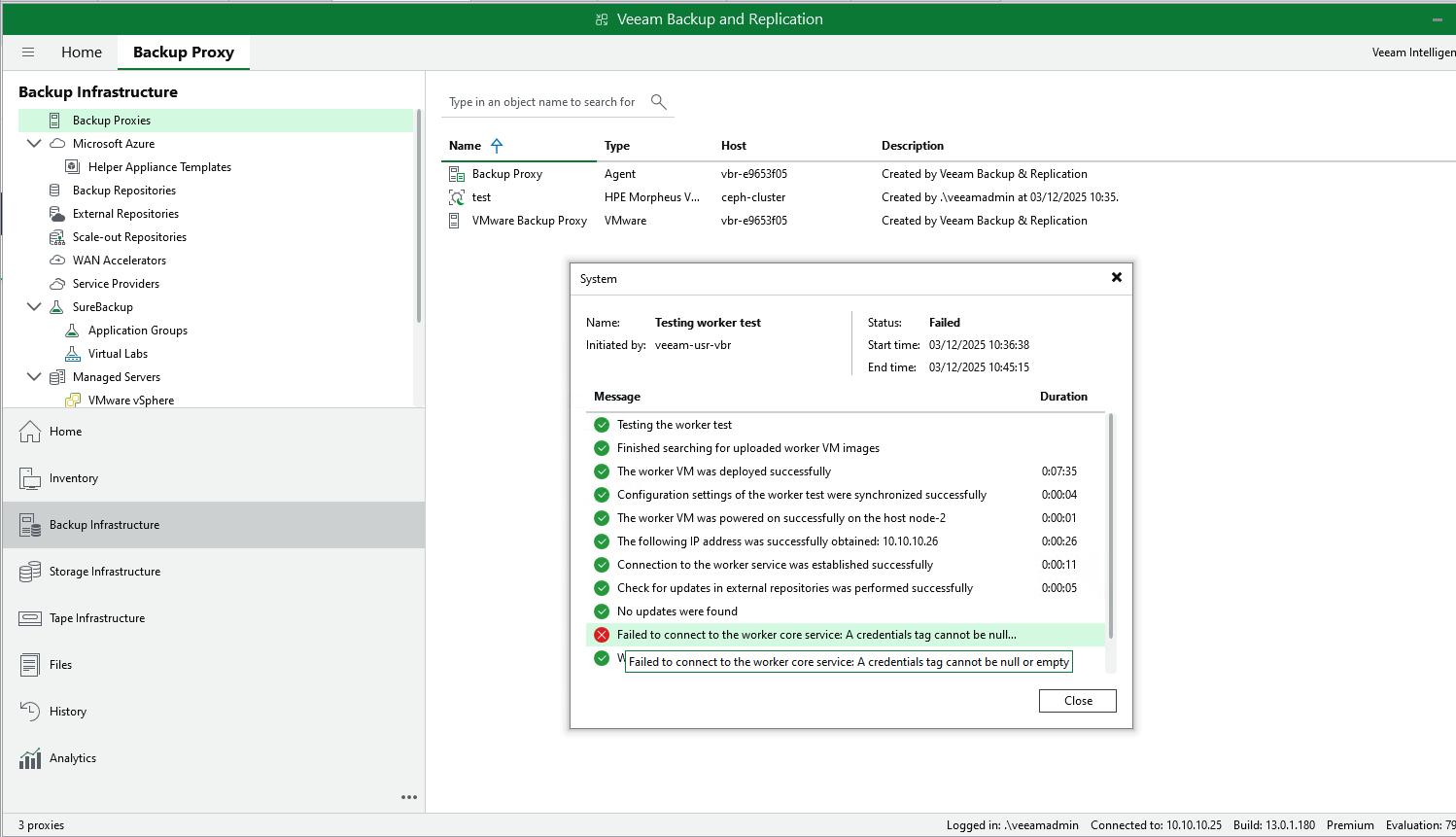
Image
EvgenyBaev
Veeam Software
Posts: 50
Liked: 4 times
Joined: Apr 11, 2019 11:06 am
Full Name: Evgeny Baev
Contact:

Re: [BETA] [HPE] Deploy VME worker failed

Post by EvgenyBaev »

Hello,

Could you please reproduce the issue with the Debug log level enabled and share the platform service logs located at:
C:\ProgramData\Veeam\Backup\Plugins\HPEMORPHEUSVME\Veeam.HPEMORPHEUSVME.PlatformSvc.log

To enable Debug logging:
1) Open the appsettings.json file as administrator.
Location:
C:\Program Files\Veeam\Plugins\HPE Morpheus VM Essentials\Service
2) In the Logging section, set the log level to Debug.
3) Restart the VeeamHpeMorpheusVmeSvc service.
4) Reproduce the issue and collect the log file.
5) Afterwards, you may set the log level back to Info and restart the service again.

Additionally, it would be helpful if you could walk through the "Edit HPE Morpheus VM Essentials Server" wizard with Debug logging enabled.

Thank you!
miquel.mariano
Novice
Posts: 4
Liked: 3 times
Joined: Dec 03, 2025 9:46 am
Full Name: Miquel Mariano
Contact:

Re: [BETA] [HPE] Deploy VME worker failed

Post by miquel.mariano »

Hi EvgenyBaev, thanks for your response.

Unfortunately, I'm using a Linux instance of VBR13 and your instructions don't fit my scenario.

However, I've been able to locate both the logs and the configuration file, but I'm unable to edit it with the veeamadmin user.

[veeamadmin@vbr-e9653f05 platform-service-hpemorpheusvme]$ pwd
/etc/veeam/platform-service-hpemorpheusvme
[veeamadmin@vbr-e9653f05 platform-service-hpemorpheusvme]$
[veeamadmin@vbr-e9653f05 platform-service-hpemorpheusvme]$
[veeamadmin@vbr-e9653f05 platform-service-hpemorpheusvme]$
[veeamadmin@vbr-e9653f05 platform-service-hpemorpheusvme]$ ls -latr
total 12
-rw-r--r--. 1 veeam-usr-platform-service-hpe veeam-grp-platform-service 6534 Dec 2 16:53 appsettings.json
drwxr-sr-x. 3 veeam-usr-platform-service-hpe veeam-grp-platform-service 45 Dec 2 16:53 .
drwxr-sr-x. 2 veeam-usr-platform-service-hpe veeam-grp-platform-service 77 Dec 2 16:53 openssl
drwxr-xr-x. 18 root root 4096 Dec 3 12:35 ..
[veeamadmin@vbr-e9653f05 platform-service-hpemorpheusvme]$
[veeamadmin@vbr-e9653f05 platform-service-hpemorpheusvme]$

I upload support bundle here https://miquelmariano.github.io/assets/ ... 854.tar.gz
bent502
Novice
Posts: 7
Liked: 2 times
Joined: Nov 17, 2025 1:02 pm
Full Name: Brett Corlett
Contact:

Re: [BETA] [HPE] Deploy VME worker failed

Post by bent502 »

I am having the same issue, but with a Windows install.

- Debug log Posted in Case #07908699

I hope this helps.
cody.ault
Veeam Software
Posts: 98
Liked: 41 times
Joined: Nov 04, 2010 2:53 pm
Full Name: Cody Ault
Contact:

Re: [BETA] [HPE] Deploy VME worker failed

Post by cody.ault »

You can temporarily enable root permissions for the appliance
cody.ault
Veeam Software
Posts: 98
Liked: 41 times
Joined: Nov 04, 2010 2:53 pm
Full Name: Cody Ault
Contact:

Re: [BETA] [HPE] Deploy VME worker failed

Post by cody.ault »

bent502 wrote: Dec 03, 2025 3:20 pm I am having the same issue, but with a Windows install. I have the Debug logs. How do I send them? Sorry, I am new here...
I sent you a PM with my email address, if you want to send them to me.
miquel.mariano
Novice
Posts: 4
Liked: 3 times
Joined: Dec 03, 2025 9:46 am
Full Name: Miquel Mariano
Contact:

Re: [BETA] [HPE] Deploy VME worker failed

Post by miquel.mariano » 1 person likes this post

Good. I have enable debug mode and try again the operation.

Here the Veeam.HPEMORPHEUSVME.PlatformSvc.log > https://miquelmariano.github.io/assets/ ... ormSvc.log

Here the worker logs > https://miquelmariano.github.io/assets/ ... 740242.zip

The tests start at 4:53 PM

Thanks you
EvgenyBaev
Veeam Software
Posts: 50
Liked: 4 times
Joined: Apr 11, 2019 11:06 am
Full Name: Evgeny Baev
Contact:

Re: [BETA] [HPE] Deploy VME worker failed

Post by EvgenyBaev »

Hello, miquel.mariano

Thank you for debug logs.

The issue happened when adding HPE Morpheus VME server to backup infrastructure.
When adding the server we create a service account on every cluster node which is managed by this server. That account is used for SSH connection to cluster nodes during backup in NBD mode.
In order to do it we call execution script request on HPE side.

In logs I see that the request was successful for the 1st and 2nd cluster node:
2025-12-02 18:49:44.3375 00021 [48867] INFO | [MorpheusController]: Successfully configured SSH access to the cluster host 1, IP address "10.10.10.81"
2025-12-02 18:49:45.0680 00019 [48867] INFO | [MorpheusController]: Successfully configured SSH access to the cluster host 2, IP address "10.10.10.82"

But it failed for the 3rd node:
2025-12-02 18:49:45.0680 00019 [48867] INFO | [MorpheusController]: Configuring SSH access to the cluster host 3, IP address: "10.10.10.83"
2025-12-02 18:49:51.3399 00019 [48867] ERROR | [MorpheusController]: Failed to configure additional settings for the HPE Morpheus VM Essentials clusters: Failed to execute the script: status Failed, exit code , error: , status message: : Veeam.Vbf.Common.Exceptions.ExceptionWithDetail: Failed to execute the script: status Failed, exit code , error: , status message:

As a result we haven't created service account on the 3rd node and haven't saved SSH credentials to VBR database.

I see later in logs that for master server (Morpheus):
2025-12-03 16:53:23.2501 00006 [441867] DEBUG | [DbProvider client]: ==> Response "Get" "https://localhost:6172/api/masterServers", "code: 200", duration: "13 msec", headers: "[]", cookies: "[]", body: "
"ServiceUserCredentialsTag\\\":null
which causes that error - A credential tag cannot be null or empty.

Could you please answer a few questions
1) Did you have any errors on Apply step when registering HPE VME server in VBR?
2) Has the server been registered in VBR if there were errors in session?
3) Is the 3rd node working - 10.10.10.83. Is it possible to ping it from VBR?
4) Have you tried to go through Edit HPE VME server wizard? Normally we have to check for missing SSH credentials and re-create them.

If editing doesn't help you can try to re-add HPE VME server to VBR and check logs for "Successfully configured SSH access" messages for all cluster nodes.

Meanwhile I will try to do reproduce similar behavior on my lab and share results. Looks like a bug on our side with managing such cases.
bent502
Novice
Posts: 7
Liked: 2 times
Joined: Nov 17, 2025 1:02 pm
Full Name: Brett Corlett
Contact:

Re: [BETA] [HPE] Deploy VME worker failed

Post by bent502 » 2 people like this post

This resolved my issue - I am guessing that I had the same issue with my VME Server on a Windows-based install of Veeam B&R. I did get an error when adding my VME Server. It did add, so I rebooted both Veeam and my VME Server, and everything looked ok. I did have a VME host in maintenance mode at the time, and it was shut off. I have since removed that host, opened the properties of my VME Server in Inventory, ran through the wizard, and did not encounter any errors. I then ran a test on my Worker, and it finished successfully and much faster this time. I kicked off my backup job, and it has been running for a few minutes with no errors. Thanks for the quick response and for allowing me to piggyback off Miquel.
cody.ault
Veeam Software
Posts: 98
Liked: 41 times
Joined: Nov 04, 2010 2:53 pm
Full Name: Cody Ault
Contact:

Re: [BETA] [HPE] Deploy VME worker failed

Post by cody.ault »

bent502 wrote: Dec 03, 2025 3:20 pm I am having the same issue, but with a Windows install.

- Debug log Posted in Case #07908699

I hope this helps.
I see the same error in your logs that Evgeny mentioned:
2025-12-02 11:38:58.2247 00015 [15200] INFO | [MorpheusController]: Configuring SSH access to the cluster host 4, IP address: "172.18.200.247"
2025-12-02 11:39:04.4897 00029 [15200] ERROR | [MorpheusController]: Failed to configure additional settings for the HPE Morpheus VM Essentials clusters: Failed to execute the script: status Failed, exit code , error: , status message: : Veeam.Vbf.Common.Exceptions.ExceptionWithDetail: Failed to execute the script: status Failed, exit code , error: , status message:
...
2025-12-02 11:39:04.4897 00029 [15200] ERROR | [Task][46cfb883-bc42-489b-8c79-86ffaf814b16][Internal]: Failed to execute task HPE Morpheus VM Essentials Registration: Veeam.Vbf.Common.Exceptions.ExceptionWithDetail: Failed to execute the script: status Failed, exit code , error: , status message
EvgenyBaev
Veeam Software
Posts: 50
Liked: 4 times
Joined: Apr 11, 2019 11:06 am
Full Name: Evgeny Baev
Contact:

Re: [BETA] [HPE] Deploy VME worker failed

Post by EvgenyBaev »

Thank you, bent502

FYI. SSH credentials are used only in the beta version and will be removed in the 1.0 release.
miquel.mariano
Novice
Posts: 4
Liked: 3 times
Joined: Dec 03, 2025 9:46 am
Full Name: Miquel Mariano
Contact:

Re: [BETA] [HPE] Deploy VME worker failed

Post by miquel.mariano » 1 person likes this post

Hi EvgenyBaev, thanks for all your analysis.

I was able to verify that there was an error in Node.3, and the VBR13 appliance couldn't connect to it.

I also resolved some DNS issues. The inventory was created using the VME manager name without including the full domain or FQDN. For some reason, the worker couldn't resolve the default search zone and couldn't connect to the cluster. By changing the inventory name to the VME cluster's IP address, the worker passed all the tests and is now working.

I should add that I performed all these tests on both a Linux instance and a Windows instance, both running version 10.0.1.180.

Thanks to everyone for your participation ;-)
EvgenyBaev
Veeam Software
Posts: 50
Liked: 4 times
Joined: Apr 11, 2019 11:06 am
Full Name: Evgeny Baev
Contact:

Re: [BETA] [HPE] Deploy VME worker failed

Post by EvgenyBaev »

Thank you, miquel.mariano. I'm glad to hear that worker deployment works.
This
Lurker
Posts: 1
Liked: never
Joined: Jan 26, 2026 1:47 pm
Contact:

Re: [BETA] [HPE] Deploy VME worker failed

Post by This »

Hi all,

Hope you guys has an idea what's the problem.
I get always an error when I will configure my HPE Morhpeus Proxy (Worker).

Error:
Failed to deploy the worker VM: Object reference not set to an instance of an object.

Any ideas what can help ?

Thx

kind regards,
This

Debug Log Entries:

Code: Select all

Successfully found the custom service plan "veeam-custom-service-plan" 40
Failed to deploy the worker VM: Object reference not set to an instance of an object.: System.NullReferenceException: Object reference not set to an instance of an object.
   at Veeam.PlatformService.BackupRestore.Workers.HpeSpecificWorkerManager.CreateWorkerInstanceAsync(BackupWorker worker, HpeRestClient restClient, VmAffinity affinity, Int64 imageId
   at Veeam.PlatformService.BackupRestore.Workers.HpeSpecificWorkerManager.DeployWorkerInstanceAsync(BackupWorker worker, String imageId, VmAffinity affinity, String cloudInitConfigY
   at Veeam.Vbf.WorkerManagement.WorkerManagers.WorkerManager.<>c__DisplayClass136_0.<<DeployVirtualMachineAsync>b__2>d.MoveNext()
--- End of stack trace from previous location ---
   at Veeam.Vbf.TaskManagement.Extensions.ProgressReporterExtensions.PerformAsync[T](IProgressReporterBase reporter, ILogger logger, String startMessage, Func`2 successMessage, Func`
172/api/serviceSessions/b9d8a41b-aa95-4810-933a-b64abb99eb56", headers: "[Authorization: ***, x-api-version: 1.0-rev46]", cookies: "[]", body: "{"status":"InProgress","id":"b9d8a41b-
Changed "worker VME-Worker, eabddd88-851c-479f-810c-64fb61f14d4c" state from Preparing to Configured
Save worker eabddd88-851c-479f-810c-64fb61f14d4c data to DB
172/api/workers/eabddd88-851c-479f-810c-64fb61f14d4c", headers: "[Authorization: ***, x-api-version: 1.0-rev46]", cookies: "[]", body: "{"name":"VME-Worker","tag":{"value":"eabddd88-
6172/api/workers/eabddd88-851c-479f-810c-64fb61f14d4c", "code: 200", duration: "27 msec", headers: "[]", cookies: "[]", body: "{"name":"VME-Worker","tag":{"value":"eabddd88-851c-479f
arting the OnTaskFinished operation. Result: GeneralError
nished the task: State: Finished, result: Error
ll continuations...
4fb61f14d4c "VME-Worker" to failed workers since its test session failed
Worker VME-Worker test failed: Object reference not set to an instance of an object.
ntinuations have been executed
cody.ault
Veeam Software
Posts: 98
Liked: 41 times
Joined: Nov 04, 2010 2:53 pm
Full Name: Cody Ault
Contact:

Re: [BETA] [HPE] Deploy VME worker failed

Post by cody.ault »

This looks like a different issue from the one in this thread. I'll email you to work on collecting the logs.
claudioteston
Novice
Posts: 4
Liked: 1 time
Joined: Feb 02, 2026 8:40 am
Full Name: Claudio Teston
Contact:

Re: [BETA] [HPE] Deploy VME worker failed

Post by claudioteston »

Hi all,
we are a partner testing the VME Plug-In on Veeam B&R 13.0.1 (NFR license).
Once adding the VME host to Veeam B&R console, the feature for Deploy Worker is not working.
We have this error:

30/01/2026 11:17:43 Failed : Failed to deploy the worker VM: Failed to deploy the instance 23: Failed to create server (0:00:07)

These are some of the logs retrieved from Veeam B&R Console:

Code: Select all

2026-01-30 11:21:29.8828 00007 [13428] ERROR | [Worker][8660f4bd-84f6-455b-a577-43a86ff5ca1d][HD-VeeamWorker]: Failed to deploy the worker. ID 24, name: "HD-VeeamWorker": Veeam.Vbf.Common.Exceptions.ExceptionWithDetail: Failed to deploy the instance 24: Failed to create server
2026-01-30 11:21:29.8828 00007 [13428] ERROR | [Worker][8660f4bd-84f6-455b-a577-43a86ff5ca1d][HD-VeeamWorker]:    at Veeam.HpeMorpheusVmeBackup.RestClient.Client.HpeRestClientExtensions.EnsureInstanceHasStatusAsync(HpeRestClient restClient, Int64 instanceId, InstanceStatus status, CancellationToken cancellationToken)
2026-01-30 11:21:29.8828 00007 [13428] ERROR | [Worker][8660f4bd-84f6-455b-a577-43a86ff5ca1d][HD-VeeamWorker]:    at Veeam.PlatformService.BackupRestore.Workers.HpeSpecificWorkerManager.DeployWorkerInstanceAsync(BackupWorker worker, String imageId, VmAffinity affinity, String cloudInitConfigYaml, CancellationToken cancellationToken)
2026-01-30 11:21:29.8828 00007 [13428] DEBUG | [Morpheus][VME-MANAGER][49b560a2-dc9a-4fcc-a688-fbed2ad8c7e8]:  <== Request "Delete" "https://172.20.139.20/api/instances/24?force=on", headers: "[Authorization: ***]", cookies: "[XSRF-TOKEN: ***]", body: "{}"
2026-01-30 11:21:30.0352 00007 [13428] DEBUG | [Morpheus][VME-MANAGER][49b560a2-dc9a-4fcc-a688-fbed2ad8c7e8]:  ==> Response "Delete" "https://172.20.139.20/api/instances/24?force=on", "code: 200", duration: "147 msec", headers: "[Transfer-Encoding: chunked, Feature-Policy: vibrate 'none' ; microphone * ; camera 'none' ; gyroscope 'none' ; magnetometer 'none' ; geolocation 'none' ; midi 'self' ; notifications 'self' ; push 'self' ; sync-xhr 'self']", cookies: "[]", body: "{"success":true}"
2026-01-30 11:21:30.0382 00007 [13428] ERROR | [Worker][8660f4bd-84f6-455b-a577-43a86ff5ca1d][HD-VeeamWorker]: Failed to deploy the worker VM: Failed to deploy the instance 24: Failed to create server: Veeam.Vbf.Common.Exceptions.ExceptionWithDetail: Failed to deploy the instance 24: Failed to create server
2026-01-30 11:21:30.0382 00007 [13428] ERROR | [Worker][8660f4bd-84f6-455b-a577-43a86ff5ca1d][HD-VeeamWorker]:    at Veeam.HpeMorpheusVmeBackup.RestClient.Client.HpeRestClientExtensions.EnsureInstanceHasStatusAsync(HpeRestClient restClient, Int64 instanceId, InstanceStatus status, CancellationToken cancellationToken)
2026-01-30 11:21:30.0382 00007 [13428] ERROR | [Worker][8660f4bd-84f6-455b-a577-43a86ff5ca1d][HD-VeeamWorker]:    at Veeam.PlatformService.BackupRestore.Workers.HpeSpecificWorkerManager.DeployWorkerInstanceAsync(BackupWorker worker, String imageId, VmAffinity affinity, String cloudInitConfigYaml, CancellationToken cancellationToken)
2026-01-30 11:21:30.0382 00007 [13428] ERROR | [Worker][8660f4bd-84f6-455b-a577-43a86ff5ca1d][HD-VeeamWorker]:    at Veeam.Vbf.WorkerManagement.WorkerManagers.WorkerManager.<>c__DisplayClass136_0.<<DeployVirtualMachineAsync>b__2>d.MoveNext()
As you can see, we have tried 23 times.
We have already rebooted Veeam Server, rebooted VME host and VME manager multiple times, but the issue is still present.
I have already opened a ticket in Veeam (#07971174) but if you want to add here some advices to try to solve the issue, i will be very happy!
Thanks in advance
EvgenyBaev
Veeam Software
Posts: 50
Liked: 4 times
Joined: Apr 11, 2019 11:06 am
Full Name: Evgeny Baev
Contact:

Re: [BETA] [HPE] Deploy VME worker failed

Post by EvgenyBaev »

Hello @claudioteston

Could you please provide the Debug logs for this issue?

The procedure for enabling Debug logging in Windows Veeam Backup & Replication (VBR) is described in the following thread:
post559342.html#p559342
If you require instructions for Linux VBR, please let me know and I can share them separately.

From an initial review, it appears that the worker VM deployment may have failed on the HPE side. The system was waiting for the instance to reach the expected state, which did not occur within a reasonable timeframe.

To help us further investigate, could you please clarify the following:
1) Are you experiencing any issues when deploying other instances via the HPE web console?
2) What version of HPE are you using?
3) Which storage type is configured for worker VM deployment?
4) Are there any specific technologies or configurations in your environment (e.g., Simplivity, CEPH, Morpheus Enterprise)?
claudioteston
Novice
Posts: 4
Liked: 1 time
Joined: Feb 02, 2026 8:40 am
Full Name: Claudio Teston
Contact:

Re: [BETA] [HPE] Deploy VME worker failed

Post by claudioteston »

Hi,
i have encountered no issues in deploying other Instances, i have a Debian VM deployed with a Custom Service Plan and no problem seen in the deployment phase.
The HPE VM Essentials Manager version is the 8.0.12, no specific technologies.
the storage type used in our Lab Environment is a local storage (2 datastores of 3 TB each one, mapped on the VME host).
How can I send you the debug logs?
Thanks.
claudioteston
Novice
Posts: 4
Liked: 1 time
Joined: Feb 02, 2026 8:40 am
Full Name: Claudio Teston
Contact:

Re: [BETA] [HPE] Deploy VME worker failed

Post by claudioteston » 1 person likes this post

EvgenyBaev
Veeam Software
Posts: 50
Liked: 4 times
Joined: Apr 11, 2019 11:06 am
Full Name: Evgeny Baev
Contact:

Re: [BETA] [HPE] Deploy VME worker failed

Post by EvgenyBaev »

Hi @claudioteston

According to the logs, we receive an instance status of "Failed" in the response from HPE approximately 20 seconds after initiating the deployment.

Unfortunately, the worker VM is deleted automatically after a failed deployment.

Would it be possible for you to configure the system to retain the worker VM following a failed deployment, and then rerun the test? Please follow these steps:
1) Open the appsettings.json file as an administrator.
Location:

Code: Select all

C:\Program Files\Veeam\Plugins\HPE Morpheus VM Essentials\Service
2) In the Workers section, set the key RemoveVmOnFailedDeploy to false.
3) Restart the VeeamHpeMorpheusVmeSvc service.
4) Reproduce the issue and collect the log file.
5) Afterwards, you may revert the changes back and restart the service again.

Additionally, after reproducing the issue, please check the HPE UI for any errors that may appear in the Provisioning section (under the History tab) for your instance.

If possible, sharing the HPE manager logs or at least the relevant error stack would be very helpful. The log files can be found here:

Code: Select all

/var/log/morpheus/morpheus-ui/current
claudioteston
Novice
Posts: 4
Liked: 1 time
Joined: Feb 02, 2026 8:40 am
Full Name: Claudio Teston
Contact:

Re: [BETA] [HPE] Deploy VME worker failed

Post by claudioteston »

Hi,
we have modified the appsettings.json to maintain the failed deployed worker but unfortunately, the vm still getting deleted by the system.
We even have upgraded HPE VM Essential Manager to the new version 8.0.13.
In the folder https://projectinformatica-my.sharepoin ... E?e=bORtx8 you can find the new logs retrieved from Veeam Console and the morpheus-ui logs.
Thanks in advance.
EvgenyBaev
Veeam Software
Posts: 50
Liked: 4 times
Joined: Apr 11, 2019 11:06 am
Full Name: Evgeny Baev
Contact:

Re: [BETA] [HPE] Deploy VME worker failed

Post by EvgenyBaev »

Hello @claudioteston

First of all, it turned out that the key "RemoveVmOnFailedDeploy" is not supported by our plugin due to certain specifics in its implementation, unlike in some other similar plugins. We plan to remove this key in the future to avoid confusion.

Regarding the issue itself, thank you for providing the logs. I don’t have a definitive root cause yet, but here’s what I’ve found so far:
  • The deployment process appears to fail during VM creation, most likely at the step of creating a CD-ROM for the worker.
    In your HPE logs for the root volume, I see:

    Code: Select all

    2026-02-03_09:18:05.75273 ''[2026-02-03 09:18:05,752] [RxCachedThreadScheduler-6]  [34mINFO  [0;39m  [36mc.m.s.d.QcowDatastoreService [0;39m - Cloning volume using qcow2 format thin without preallocation: sudo mkdir -p "*******" ; sudo ionice -c 3 qemu-img convert -f qcow2 -O qcow2 "/var/morpheus/kvm/images/4d2ebd94-34ea-49ea-812d-c03860790683" "/datastore1/vbrworker/hvm_40-disk-0-2bb8f40" 
    2026-02-03_09:18:05.75288 ''[2026-02-03 09:18:09,149] [RxCachedThreadScheduler-6]  [34mINFO  [0;39m  [36mc.m.p.KvmProvisionService [0;39m - Server Volumes: [com.morpheus.StorageVolume : 93] - com.morpheus.StorageVolume : 93 
    And after that we have an error:

    Code: Select all

    2026-02-03_09:18:09.16874 '[2026-02-03 09:18:09,168] [RxCachedThreadScheduler-6]  [1;31mERROR [0;39m  [36mc.m.p.KvmProvisionService [0;39m - createServer error: java.lang.NullPointerException: Cannot get property 'externalPath' on null object 
    In my environment, cloning is also performed for the CD-ROM:

    Code: Select all

    2026-02-03_10:56:06.20196 ''[2026-02-03 10:56:06,202] [RxCachedThreadScheduler-9]  [34mINFO  [0;39m  [36mc.m.s.d.QcowDatastoreService [0;39m - Cloning volume using qcow2 format thin without preallocation: sudo mkdir -p "*******" ; sudo ionice -c 3 qemu-img convert -f qcow2 -O qcow2 "/var/morpheus/kvm/images/e825372f-5409-48a3-b95c-118a8cb1932b" "/datastore1/BEV-worker-datastore1-test/hvm_93-disk-0-d9c4563" 
    2026-02-03_10:56:06.20238 ''[2026-02-03 10:56:11,855] [RxCachedThreadScheduler-9]  [34mINFO  [0;39m  [36mc.m.p.KvmProvisionService [0;39m - Server Volumes: [com.morpheus.StorageVolume : 272] - com.morpheus.StorageVolume : 272 
    ...
    2026-02-03_10:56:12.34732 '[2026-02-03 10:56:12,347] [RxCachedThreadScheduler-9]  [34mINFO  [0;39m  [36mc.m.s.d.QcowDatastoreService [0;39m - Determined volume format for cloning: raw 
    2026-02-03_10:56:12.34735 ''[2026-02-03 10:56:12,347] [RxCachedThreadScheduler-9]  [34mINFO  [0;39m  [36mc.m.s.d.QcowDatastoreService [0;39m - Cloning volume using cp: sudo mkdir -p "*******" ; sudo ionice -c 3 cp -f "/var/morpheus/kvm/cloud-init/hvm_93-sda" "/datastore1/BEV-worker-datastore1-test/hvm_93-sda" 
    2026-02-03_10:56:12.34857 ''[2026-02-03 10:56:12,515] [RxCachedThreadScheduler-9]  [34mINFO  [0;39m  [36mc.m.c.KvmComputeUtility [0;39m - tgtExtension: qcow2 
    2026-02-03_10:56:12.51608 ''[2026-02-03 10:56:12,520] [RxCachedThreadScheduler-9]  [34mINFO  [0;39m  [36mc.m.c.KvmComputeUtility [0;39m - tgtExtension: iso 
  • When comparing the worker VM specifications, I noticed that in your case, only the root disk was presented just before the failure, whereas my specification includes both a root disk and a CD-ROM.
To help narrow down the possible causes, could you please check and try the following:
  • Have you added your local storage "datastore1" as a Directory Pool?
  • What is the default image location - "datastore1" or the default local storage?
  • Have you tried deploying a worker to the default local storage instead of "datastore1"? If so, does the same issue occur?
  • Could you attempt to deploy an instance through the HPE UI using the Veeam service plan and the image HpeMorpheusVmeWorker_13.1.0.222.qcow2? This will help us exclude plugin-specific issues. If the deployment still fails, any leftover instance artifacts would be useful for further investigation.
From the plugin side, we do not perform any special actions - we simply send a request for instance creation with the specified service plan, datastore ID, virtual image ID, network settings, and cloud-init script. The rest should be handled by HPE.

If you are able to provide answers to the above questions, it will help us move forward. I can also reach out to the HPE team for further investigation, and having this information will be very helpful.

Thank you!
Post Reply

Who is online

Users browsing this forum: No registered users and 2 guests