Comprehensive data protection for all workloads
Post Reply
AlexLeadingEdge
Service Provider
Posts: 516
Liked: 80 times
Joined: Dec 14, 2015 9:42 pm
Full Name: Alex F.
Contact:

Login into VeeamBR 13.0.1.1071_20251217 failing after upgrade

Post by AlexLeadingEdge »

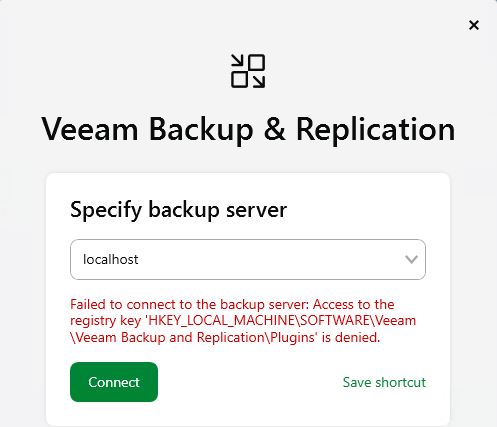
Can someone tell me what I'm doing wrong here?

Image

As far as I can tell none of the users can access that Registry key after the upgrade:

Code: Select all

PS C:\WINDOWS\system32> $path = 'HKLM:\SOFTWARE\Veeam\Veeam Backup and Replication\Plugins'
PS C:\WINDOWS\system32> (Get-Acl $path).Access |
>>   Sort-Object IdentityReference |
>>   Format-Table IdentityReference, RegistryRights, AccessControlType, IsInherited -Auto

IdentityReference      RegistryRights AccessControlType IsInherited
-----------------      -------------- ----------------- -----------
BUILTIN\Administrators    FullControl             Allow        True
BUILTIN\IIS_IUSRS         FullControl             Allow        True
NT AUTHORITY\SYSTEM       FullControl             Allow        True
AlexLeadingEdge
Service Provider
Posts: 516
Liked: 80 times
Joined: Dec 14, 2015 9:42 pm
Full Name: Alex F.
Contact:

Re: Login into VeeamBR 13.0.1.1071_20251217 failing after upgrade

Post by AlexLeadingEdge »

Ok, I've given myself enough permissions to access this registry key and all sub-keys using the PowerShell script below, and it seems to allow me to log in now:
# Run in an elevated PowerShell window (Administrator)
$path = 'HKLM:\SOFTWARE\Veeam\Veeam Backup and Replication\Plugins'

try {
$acl = Get-Acl -Path $path

# Allow standard users to read the key (and subkeys)
$rule = New-Object System.Security.AccessControl.RegistryAccessRule(
'Users',
'ReadKey',
'ContainerInherit,ObjectInherit',
'None',
'Allow'
)

$acl.SetAccessRule($rule)
Set-Acl -Path $path -AclObject $acl

'OK: Granted Users ReadKey on ' + $path
}
catch {
'ERROR: ' + $_.Exception.Message
}
AlexLeadingEdge
Service Provider
Posts: 516
Liked: 80 times
Joined: Dec 14, 2015 9:42 pm
Full Name: Alex F.
Contact:

Re: Login into VeeamBR 13.0.1.1071_20251217 failing after upgrade

Post by AlexLeadingEdge » 1 person likes this post

Right now nothing is wrong with the login, so I'm not sure what there is to see, but I'm happy to let you have a look at the install as we have several other clients I will want to upgrade to v13 in the near future.

The only issue I have at the moment is that one of the client servers ("fileserver") isn't getting their updated components for some reason. When I tried to make logs for your case / ticket it said my client server ("fileserver") certificate is invalid?

Case #07947997
DataDefender
Enthusiast
Posts: 27
Liked: 2 times
Joined: Dec 20, 2023 10:14 pm
Location: Germany
Contact:

[MERGED] Cannot use local console after upgrading to v13

Post by DataDefender »

Hey there,

After upgrading (using the Windows Server ISO), I can no longer connect to B&R from the backup server using the console unless I start it with Run as administrator. Shouldn’t it prompt for permission via UAC when admin privileges are required? It has beed so in v12.

Error:
Failed to connect to the backup server: Access to the registry key ‘HKEY_LOCAL_MACHINE\SOFTWARE\Veeam\Veeam Backup and Replication\Plugins\13.0.0\Console’ is denied

Connecting from a remote machine (for example, my admin workstation) works without any problems.

Does anyone have a quick fix for this, or should I reach out to support directly?

Best,
DD
Mildur
Product Manager
Posts: 11385
Liked: 3162 times
Joined: May 13, 2017 4:51 pm
Full Name: Fabian K.
Location: Switzerland
Contact:

Re: Login into VeeamBR 13.0.1.1071_20251217 failing after upgrade

Post by Mildur »

Hi DD,

Alex shared a quick fix, but I strongly recommend opening a support case so we can investigate this issue properly.
A customer should not have to change permissions on their own.

Best,
Fabian
Product Management Analyst @ Veeam Software
DataDefender
Enthusiast
Posts: 27
Liked: 2 times
Joined: Dec 20, 2023 10:14 pm
Location: Germany
Contact:

Re: Login into VeeamBR 13.0.1.1071_20251217 failing after upgrade

Post by DataDefender »

Hi Fabian,

allrighty. I will open a ticket then.

Thx,
DD
DataDefender
Enthusiast
Posts: 27
Liked: 2 times
Joined: Dec 20, 2023 10:14 pm
Location: Germany
Contact:

Re: Login into VeeamBR 13.0.1.1071_20251217 failing after upgrade

Post by DataDefender »

I just wanted to follow up and let you know that I was able to resolve the issue with support. We fixed it by adjusting the permissions on the affected registry key.
Best,
DD
woodlandhill
Lurker
Posts: 1
Liked: never
Joined: Dec 06, 2021 9:16 am
Full Name: Andrew Woodland
Contact:

Re: Login into VeeamBR 13.0.1.1071_20251217 failing after upgrade

Post by woodlandhill »

what were the changes made to the reg key please?
Mildur
Product Manager
Posts: 11385
Liked: 3162 times
Joined: May 13, 2017 4:51 pm
Full Name: Fabian K.
Location: Switzerland
Contact:

Re: Login into VeeamBR 13.0.1.1071_20251217 failing after upgrade

Post by Mildur »

You can try the script from Alex earlier in this topic (disclaimer: no guarantees from Veeam), or reach out to Veeam Customer Support for guidance.

Best,
Fabian
Product Management Analyst @ Veeam Software
Post Reply

Who is online

Users browsing this forum: AdsBot [Google], ericlaiys78 and 138 guests