why does Veeam B&R 13.0.1.2067 create folders named Veeam on the Desktop (seen on different servers here, like W2K16 & W2K22) ...
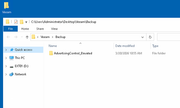
What is the purpose?
Regards,
Didi7

Did this happen? I'm on community edition in the lab/at home so don't tend to get much of a response from support casesPlease open a Support case for the issue and share the case number here once created. Thanks!

You'll need several cups of tea as VBR install takes a whileI will continue with VBR


Users browsing this forum: Google [Bot] and 385 guests