Comprehensive data protection for all workloads
Post Reply
Didi7
Veteran
Posts: 607
Liked: 103 times
Joined: Oct 17, 2014 8:09 am
Location: Hypervisor
Contact:

New desktop folder created during VBR 13.0.1.2067 installation ...

Post by Didi7 » 2 people like this post

Hello,

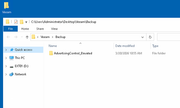
why does Veeam B&R 13.0.1.2067 create folders named Veeam on the Desktop (seen on different servers here, like W2K16 & W2K22) ...
Image

What is the purpose?

Regards,
Didi7
Using the most recent Veeam B&R in many different environments now and counting!

*** Nominated for being the earliest early adopter of VSA ***
david.domask
Product Manager
Posts: 3532
Liked: 850 times
Joined: Jun 28, 2016 12:12 pm
Contact:

Re: New desktop folder created during VBR 13.0.1.2067 installation ...

Post by david.domask »

Hi Didi7,

Looks like it's a known issue currently being reviewed. This comes from Microsoft Edge WebView, and as I get it the expected place for this should be in %LocalAppData%/Veeam, unclear why it got written to the desktop.

Please open a Support case for the issue and share the case number here once created. Thanks!
David Domask | Product Management: Principal Analyst
Didi7
Veteran
Posts: 607
Liked: 103 times
Joined: Oct 17, 2014 8:09 am
Location: Hypervisor
Contact:

Re: New desktop folder created during VBR 13.0.1.2067 installation ...

Post by Didi7 » 2 people like this post

Hello David,

thanks for your reply. What I can say is the following ...

* It happens on Windows Server 2016 systems (in this case an older version of VBR has been upgraded)
* It happens on Windows Server 2022 systems (in this case VBR was completely removed long ago and re-installed with 13.0.1.2067)

If you remove this folder from the desktop, it is automatically re-created :mrgreen:

Good to know, that it is a known issue already, that's being reviewed.

Thanks.
Using the most recent Veeam B&R in many different environments now and counting!

*** Nominated for being the earliest early adopter of VSA ***
robnicholsonmalt
Expert
Posts: 191
Liked: 37 times
Joined: Dec 21, 2018 11:42 am
Full Name: Rob Nicholson
Contact:

Re: New desktop folder created during VBR 13.0.1.2067 installation ...

Post by robnicholsonmalt »

I've just built a new domain based Windows Server 2025 with Hyper-V and Veeam v13 in the lab - same thing is happening. Contains one sub-folder called AdvertisingControl_NonElevated. Contents found here:

https://maltsystems-my.sharepoint.com/: ... 4?e=Tin991
Please open a Support case for the issue and share the case number here once created. Thanks!
Did this happen? I'm on community edition in the lab/at home so don't tend to get much of a response from support cases :-(
Didi7
Veteran
Posts: 607
Liked: 103 times
Joined: Oct 17, 2014 8:09 am
Location: Hypervisor
Contact:

Re: New desktop folder created during VBR 13.0.1.2067 installation ...

Post by Didi7 »

Nope!

It's a known issue. I suppose it will get fixed the next version or upgrade. Issue happens on 99,9% of my systems, no matter if a new installation or upgrade.

I suppose that's a ...

+1

... from you?
Using the most recent Veeam B&R in many different environments now and counting!

*** Nominated for being the earliest early adopter of VSA ***
robnicholsonmalt
Expert
Posts: 191
Liked: 37 times
Joined: Dec 21, 2018 11:42 am
Full Name: Rob Nicholson
Contact:

Re: New desktop folder created during VBR 13.0.1.2067 installation ...

Post by robnicholsonmalt »

It is...
Didi7
Veteran
Posts: 607
Liked: 103 times
Joined: Oct 17, 2014 8:09 am
Location: Hypervisor
Contact:

Re: New desktop folder created during VBR 13.0.1.2067 installation ...

Post by Didi7 »

Today I am going to install a fresh VBR 13.0.1.2067 on Windows Server 2025 and I expect the same behavior, as with previous installations on Windows 2016, 2019 and 2022.

Will post results here.
Using the most recent Veeam B&R in many different environments now and counting!

*** Nominated for being the earliest early adopter of VSA ***
david.domask
Product Manager
Posts: 3532
Liked: 850 times
Joined: Jun 28, 2016 12:12 pm
Contact:

Re: New desktop folder created during VBR 13.0.1.2067 installation ...

Post by david.domask »

@Didi7,

Appreciate your testing; in one of the cases, Veeam Support is reviewing the behavior with RND and as I understand it working towards a longer-term solution, but please stay tuned I will update the thread when we have more information.

For the issue itself, the issue is "mostly harmless", and will be corrected in future releases as noted without a need for any interaction.

If you do end up doing your test, please test and confirm if it occurs while you have a license installed in Veeam or not, the folder appearing on desktop is related to items that appear for community edition on first launch of console.
David Domask | Product Management: Principal Analyst
Didi7
Veteran
Posts: 607
Liked: 103 times
Joined: Oct 17, 2014 8:09 am
Location: Hypervisor
Contact:

Re: New desktop folder created during VBR 13.0.1.2067 installation ...

Post by Didi7 » 1 person likes this post

Hallo David,

I will do both for your continued valuation. I will create a VMware snapshot prior to installation and will test without and with a license. The Windows 2025 server has been installed yesterday and VBR was never installed on the system.

Currently installation Windows Updates and as soon as that is finished, I will continue with VBR.

Will post results later ...
Using the most recent Veeam B&R in many different environments now and counting!

*** Nominated for being the earliest early adopter of VSA ***
robnicholsonmalt
Expert
Posts: 191
Liked: 37 times
Joined: Dec 21, 2018 11:42 am
Full Name: Rob Nicholson
Contact:

Re: New desktop folder created during VBR 13.0.1.2067 installation ...

Post by robnicholsonmalt »

I will continue with VBR
You'll need several cups of tea as VBR install takes a while ;-)
Didi7
Veteran
Posts: 607
Liked: 103 times
Joined: Oct 17, 2014 8:09 am
Location: Hypervisor
Contact:

Re: New desktop folder created during VBR 13.0.1.2067 installation ...

Post by Didi7 »

There are so many tasks in between :lol:
Using the most recent Veeam B&R in many different environments now and counting!

*** Nominated for being the earliest early adopter of VSA ***
Didi7
Veteran
Posts: 607
Liked: 103 times
Joined: Oct 17, 2014 8:09 am
Location: Hypervisor
Contact:

Re: New desktop folder created during VBR 13.0.1.2067 installation ...

Post by Didi7 »

Allright, installing VBR 13.0.1.2067 on a fresh Windows Server 2025 without any license (Community Edition) and launching VBR results in a desktop folder with the following contents ...

C:\Users\Administrator\Desktop\Veeam\Backup\AdvertisingControl_Elevated

etc.

Reverting VM and then next try using a VUL license now ...
Using the most recent Veeam B&R in many different environments now and counting!

*** Nominated for being the earliest early adopter of VSA ***
robnicholsonmalt
Expert
Posts: 191
Liked: 37 times
Joined: Dec 21, 2018 11:42 am
Full Name: Rob Nicholson
Contact:

Re: New desktop folder created during VBR 13.0.1.2067 installation ...

Post by robnicholsonmalt »

I'm on community edition in the lab as well.
Didi7
Veteran
Posts: 607
Liked: 103 times
Joined: Oct 17, 2014 8:09 am
Location: Hypervisor
Contact:

Re: New desktop folder created during VBR 13.0.1.2067 installation ...

Post by Didi7 »

Ok, fresh install on W2K25 with a VUL license does not create a Veeam folder on the desktop launching the console. The big environment ist VSA based already, so no Windows involved at all.

But we also still have socket-based licenses with active maintenance contracts on Windows systems in use, which were upgraded from older versions and at least one Windows 2019 server also has the Veeam folder on desktop issue.
Using the most recent Veeam B&R in many different environments now and counting!

*** Nominated for being the earliest early adopter of VSA ***
david.domask
Product Manager
Posts: 3532
Liked: 850 times
Joined: Jun 28, 2016 12:12 pm
Contact:

Re: New desktop folder created during VBR 13.0.1.2067 installation ...

Post by david.domask »

Thanks for testing that.

I got word from Veeam Support that we now have a fix for the issue; as noted earlier, the issue will be corrected in future releases, but if you would like to resolve it sooner than later, open a Support Case and review the issue with Veeam Support. Please mention that you believe you are impacted by the issue in KB0060962; Veeam Support will still confirm the situation, but if it matches, they will be able to assist with a fix.
David Domask | Product Management: Principal Analyst
robnicholsonmalt
Expert
Posts: 191
Liked: 37 times
Joined: Dec 21, 2018 11:42 am
Full Name: Rob Nicholson
Contact:

Re: New desktop folder created during VBR 13.0.1.2067 installation ...

Post by robnicholsonmalt »

Can't find KB0060962 - not published yet?
david.domask
Product Manager
Posts: 3532
Liked: 850 times
Joined: Jun 28, 2016 12:12 pm
Contact:

Re: New desktop folder created during VBR 13.0.1.2067 installation ...

Post by david.domask »

That is a reference number for Veeam Support, it's not a public KB. Private Fixes typically must be received via a support case as noted in the previous post.
David Domask | Product Management: Principal Analyst
Post Reply

Who is online

Users browsing this forum: Baidu [Spider], Semrush [Bot] and 8 guests