The login process appears to succeed at first and the console opens and displays the backup server, but after about 3–5 seconds, I’m logged out with an “unauthorized access” error.
The only relevant information I can find is in the Application Event Log at the time of the error (see details at the bottom of this message).
For context:
The console is installed on a fresh Windows Server 2022 VM.
I’ve already tried reinstalling the console, but the issue persists.
Additionally, I attempted to create a new user via the Web GUI, but I receive an “invalid username” error. I am currently logged in as “veeamadmin” and have tried various formats (e.g., user1, domain\user, and other random names), but all result in the same error. I am assuming they are connected as it seems that veeamadmin has lost some of it's privileges
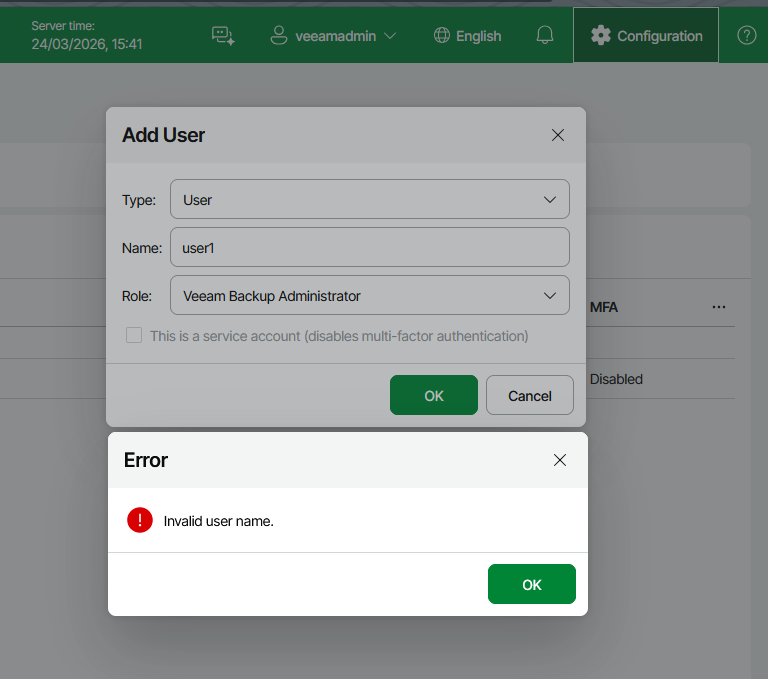
Has anyone else encountered this issue? This is only a test server so I have not logged case with Veeam yet
---application event log from V13 Console----
The description for Event ID 0 from source Veeam Backup cannot be found. Either the component that raises this event is not installed on your local computer or the installation is corrupted. You can install or repair the component on the local computer.
If the event originated on another computer, the display information had to be saved with the event.
The following information was included with the event:
The message resource is present but the message was not found in the message table