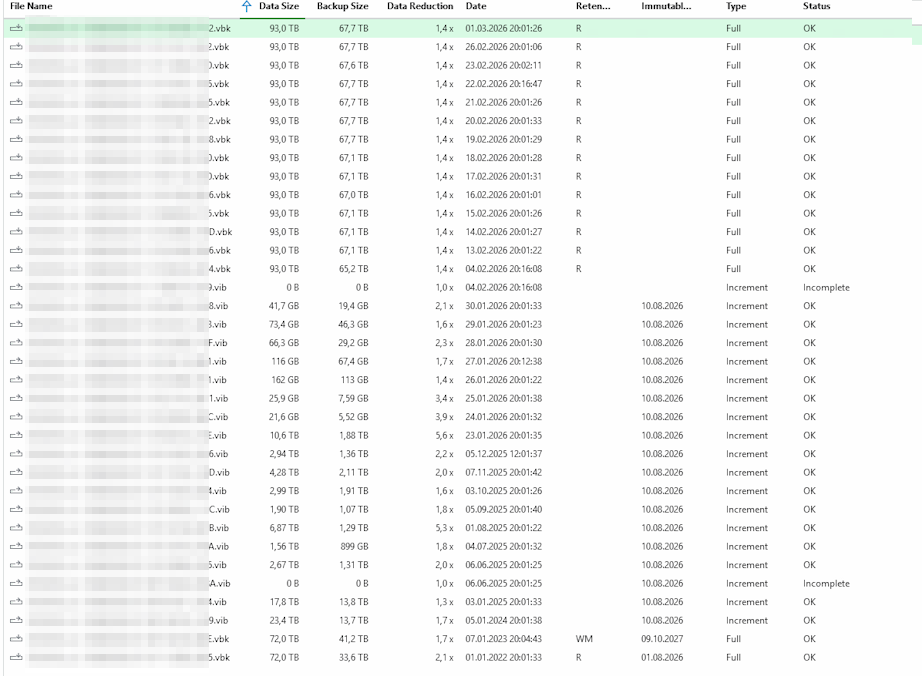
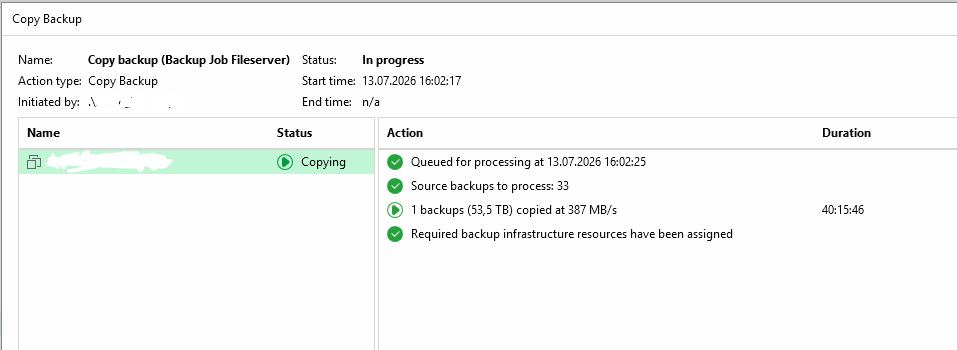
Unfortunately, the repository move/copy operation failed every time because the Veeam processes on the target hardened repository linux appliance ran out of memory.
As a workaround, I switched to using the registry key that enables migration through a Backup Copy Job. So far, this approach has been working, although I've encountered several other challenges along the way, such as the target storage running out of storage space.
One issue I've noticed with the Backup Copy Job, however, is that the retention flags are completely incorrect after the migration.
The monthly and yearly retention points (VBKs) that are marked on the source repository do not appear correctly on the target repository. For example, the oldest monthly restore points are shown only as regular VIBs on the target side and no longer have the expected retention flags assigned to them.
Has anyone else observed the same behavior during a repository migration using a Backup Copy Job?
I've also a case open on this issues: 08139094
btw. incompletely copied items are not immuteable yet... i had this issue many times, as the out-of-memory error... though that filled my physical storage, as it didn't get deleted on block level at the storage (and it was in additional storage snapshots too!)
with the first test of the "backup copy job" i ended up with only one VBK, this was also immutable then, i couldn't delete of course from the UI... again fillled my storage and the chain where never copied completely, even though, when you right-click the backup copy job and click sync-now, then you'll get the prompt where you could choose "all" but that doesn't change anything !?
anyway for the "FULL-copy" with the regkey you'll need a new copy job
 hence i had this full backup i couldn't delete... i just had to enable shell and root access on the VBR hardened linux repo to remove the immutable flag manually and delete the file manually then!