Comprehensive data protection for all workloads
Post Reply
DaStivi
Veeam Legend
Posts: 500
Liked: 100 times
Joined: Jun 30, 2015 9:13 am
Full Name: Stephan Lang
Location: Austria
Contact:

[Split] BackupCopyMirrorAll does not set retention flags

Post by DaStivi »

I'm currently dealing with a very similar scenario: a source VM with approximately 80 TB of data and multiple yearly, monthly, and weekly retention points. The backup chain itself is around 1 PB in logical size, although it only consumes about 150 TB of physical storage.

Unfortunately, the repository move/copy operation failed every time because the Veeam processes on the target hardened repository linux appliance ran out of memory.

As a workaround, I switched to using the registry key that enables migration through a Backup Copy Job. So far, this approach has been working, although I've encountered several other challenges along the way, such as the target storage running out of storage space.

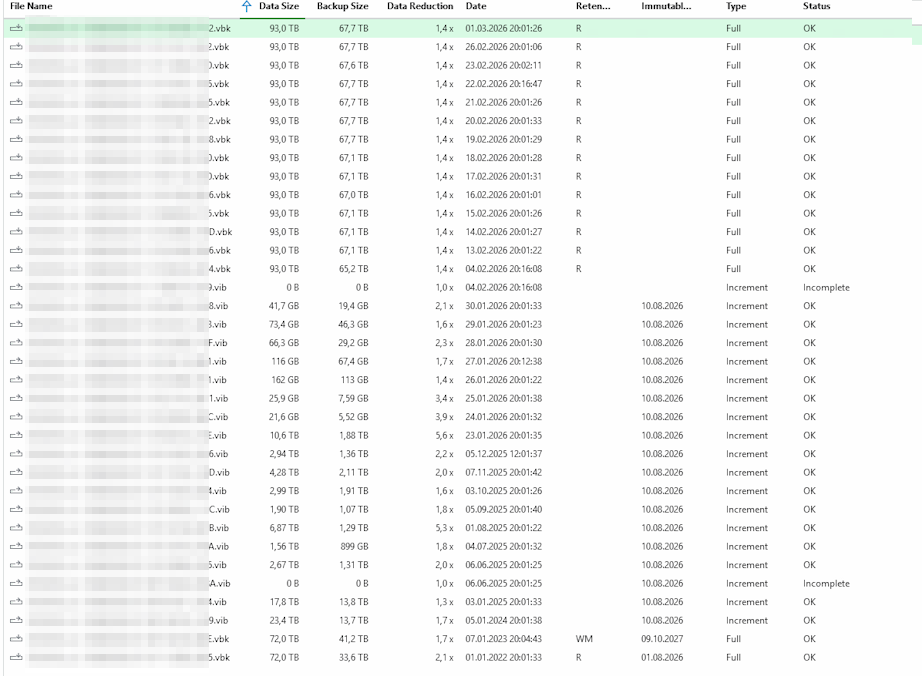
One issue I've noticed with the Backup Copy Job, however, is that the retention flags are completely incorrect after the migration.

The monthly and yearly retention points (VBKs) that are marked on the source repository do not appear correctly on the target repository. For example, the oldest monthly restore points are shown only as regular VIBs on the target side and no longer have the expected retention flags assigned to them.

Has anyone else observed the same behavior during a repository migration using a Backup Copy Job?

I've also a case open on this issues: 08139094

btw. incompletely copied items are not immuteable yet... i had this issue many times, as the out-of-memory error... though that filled my physical storage, as it didn't get deleted on block level at the storage (and it was in additional storage snapshots too!)

with the first test of the "backup copy job" i ended up with only one VBK, this was also immutable then, i couldn't delete of course from the UI... again fillled my storage and the chain where never copied completely, even though, when you right-click the backup copy job and click sync-now, then you'll get the prompt where you could choose "all" but that doesn't change anything !?

anyway for the "FULL-copy" with the regkey you'll need a new copy job 🤦‍♂️ hence i had this full backup i couldn't delete... i just had to enable shell and root access on the VBR hardened linux repo to remove the immutable flag manually and delete the file manually then!
david.domask
Product Manager
Posts: 3768
Liked: 914 times
Joined: Jun 28, 2016 12:12 pm
Contact:

Re: [Split] BackupCopyMirrorAll does not set retention flags

Post by david.domask »

Hi DaStivi,

I've split your question from the previous topic as this is a bit different than the "How To" questions on the previous topic.

BackupCopyMirrorAll simply changes the backup copy job's logic to iterate over all existing points in the source job, it is not the same as what the Move operation does. That is to say, normally Backup Copy jobs act exclusively on the newest restore point, reads data from that restore point and writes it to a new chain. Backup Copy jobs are _not_ simply copying files, but instead creating a new and independent backup chain with the same backup data.

Since it's a new job with its own independent chain & retention, the retention will follow the configured retention on the new Backup Copy job.

I advise continue with Support on the OOM issue for Move Backup, as it sounds like what you're looking for.
David Domask | Product Management: Principal Analyst
DaStivi
Veeam Legend
Posts: 500
Liked: 100 times
Joined: Jun 30, 2015 9:13 am
Full Name: Stephan Lang
Location: Austria
Contact:

Re: [Split] BackupCopyMirrorAll does not set retention flags

Post by DaStivi »

this is what the source job looks like:
Image

and this is what the "backup copy job" made out of it:
Image
DaStivi
Veeam Legend
Posts: 500
Liked: 100 times
Joined: Jun 30, 2015 9:13 am
Full Name: Stephan Lang
Location: Austria
Contact:

Re: [Split] BackupCopyMirrorAll does not set retention flags

Post by DaStivi »

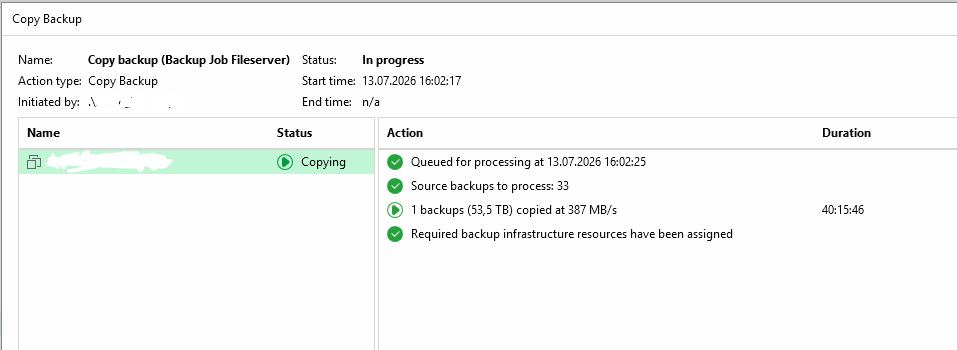
I'm currently re-testing the "Copy/Move Backup Points" task after increasing the RAM assigned to the VHR appliance. This time it looks like it's actually progressing, which is good.

However, there is still a major concern:

Previously, the task would run out of memory after transferring roughly 20 TB. With the additional RAM, it managed to transfer significantly more data then even needed for a single restore point!

As shown in the screenshots above, the initial VBK occupied 36 TB. The regular Backup Copy Job actually reduced the size slightly on the VHR side, resulting in 33.6 TB being used thanks to some additional data reduction.

Now, the Backup Points Copy task is still processing the first VBK, but according to the statistics it has already transferred 54 TB and continues to grow.

Why is that happening? I would have expected the transferred data volume to be much closer to the actual VBK size. Is there some internal rehydration, block processing, or another mechanism involved that would explain why the transfer amount is significantly larger than both the source VBK (36 TB) and the resulting backup-copy on the target (33.6 TB)? even in the first VBK shouldn't even happen any re-hydration? the "normal backup copy" als managed cleanly to save the space with the block-level cloning mechanism of the xfs-vhr...

Image

its also really using that amount of space on the filesystem!
david.domask
Product Manager
Posts: 3768
Liked: 914 times
Joined: Jun 28, 2016 12:12 pm
Contact:

Re: [Split] BackupCopyMirrorAll does not set retention flags

Post by david.domask »

Hi DaStivi

Just to confirm, you're seeing

- The actual copied backup file is the expected size
- The data transferred however is greater than the resulting backup size?

If so, then it may be expected if Fast Clone was in use or if the source was a deduplicating appliance; data needs to leave the source in its full size, file system data reduction cannot be preserved during the transfer, only once the data lands on the target device.

However this is just speculation based on what you wrote, so please investigate this with Support as there are many factors that may come into play here, and Support will be able to review the debug logs and explain.
David Domask | Product Management: Principal Analyst
Post Reply

Who is online

Users browsing this forum: Bing [Bot], lukash, Mildur, nikita.kozlenko, pybfr, reiso22 and 445 guests