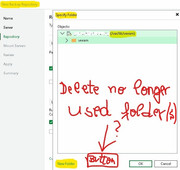
sometimes you decide to go a different way and possibly would like to change the subdirectory where VM-backups are located. In case of Hardened Repositories or Linux Repositories it would be easier, if you could not only create subdirectories, but also delete old ones no longer used.
Maybe you would like to create another subdirectory with a different name parallel to another older used subdirectory, but unfortunately it's not possible to delete empty subdirectories in the backup repository dialogue. Instead, you to need to logon to the console of e.g. a Hardened Repository system and use the command line to delete no longer used subdirectories.
We wished there would be a button available in the following dialogue, when browsing /var/lib/veeam ...
Thank you for your attention.
Using the most recent Veeam B&R in many different environments now and counting!
*** Nominated for being the earliest early adopter of VSA ***
Understood on the request, but since the Browse button is only available when creating a new repository, I think maybe it's not best place.
Is the concern mostly aesthetic? That you want to avoid having empty directories and avoid them being accidentally selected?
Will note the feedback, but since the Appliance is locked down by design access through the Files section is restricted intentionally, so would imagine this probably would go in the Host Management console, but that also isn't so convenient.
David Domask | Product Management: Principal Analyst
Hello David, primarily this is aesthetic and yes we would like to avoid having empty directories or accidentally selecting them.
How did I remove empty no longer used subdirectories? Using the Host Management Console and shell, that works, but imo more risk to make unwanted errors.
Using the most recent Veeam B&R in many different environments now and counting!
*** Nominated for being the earliest early adopter of VSA ***