I've just upgraded my computer to Windows 11 (actually did a complete fresh install) and installed the Veeam Agent for Windows (free edition). Now I'm experiencing a strange phenomenon. I've set the backup to happen at 1:30 in the morning, backing up to a file share on my local server.
After finishing using my computer for the day, I put it to sleep. It then wakes up at 1:30 and does the backup. All is good so far. Next morning, I wake my computer to use it and sometimes during the sign-in process the computer just goes to sleep again before the sign-in is complete. Sometimes, the sign-in completes and the Veeam agent pops up telling me it is going to sleep and offers me a chance to cancel the operation. Lastly, sometimes the computer just does a complete reboot between the sign-in attempt and actually getting signed-in.
Has anybody else experienced this?
This does not happen if the same computer is running Windows 10 instead of Windows 11.
Thank you.
Greg
-
GChuck
- Influencer
- Posts: 10
- Liked: never
- Joined: Mar 02, 2022 5:18 pm
- Full Name: Greg
- Contact:
-
Mildur
- Product Manager
- Posts: 11832
- Liked: 3345 times
- Joined: May 13, 2017 4:51 pm
- Full Name: Fabian K.
- Location: Switzerland
- Contact:
Re: Veeam sleeps or reboots after login Window 11
Hello Greg
May I ask, which windows version have you installed?
Windows 11 22H2 it‘s not supported yet and unexpected behavior is possible. In that case please wait for the official support from veeam.
If you use a supported version, please provide a support case ID for this issue, as requested when you click New Topic. Technical issues always requires a support case before posting them to the forums.
Without case number, the topic will eventually be deleted by moderators.
Best regards,
Fabian
PS: support can only help if you upload logs https://www.veeam.com/kb1832
May I ask, which windows version have you installed?
Windows 11 22H2 it‘s not supported yet and unexpected behavior is possible. In that case please wait for the official support from veeam.
If you use a supported version, please provide a support case ID for this issue, as requested when you click New Topic. Technical issues always requires a support case before posting them to the forums.
Without case number, the topic will eventually be deleted by moderators.
Best regards,
Fabian
PS: support can only help if you upload logs https://www.veeam.com/kb1832
Product Management Analyst @ Veeam Software
-
GChuck
- Influencer
- Posts: 10
- Liked: never
- Joined: Mar 02, 2022 5:18 pm
- Full Name: Greg
- Contact:
Re: Veeam sleeps or reboots after login Window 11
Fabian, thanks for the reply.
First, I am using the Free version of Veeam for Windows. I realize that the Free version is not supported other than through the user forums. That is why I posted my question there.
I am using Veeam on a Windows 11 21H2 Build 22000.1098 system. The computer is a home built ASUS Z690 Core i7-12700, 32GB memory, 1 NVMe 500GB system drive and 1 NVMe 1TB data drive. I use Veeam to do a Volume level backup of just the system drive nightly to a home built file server running TrueNAS.
Further to my original post, I have uninstalled and then re-installed the Veeam Agent for Windows 5.0.3.4708 to see if that would fix the problem. It didn't! However, this morning when logging in I did notice that a number of pop-ups flashed by quickly, and then an option from the Veeam Agent telling me that the computer was going to sleep and asking whether I wished to Cancel or Continue. I pressed the Cancel button to prevent the machine from sleeping.
The Veeam Agent had awakened the computer to run the scheduled backup a 1:30am and after the backup had been completed (successfully), the computer had then been put back to sleep!
I downloaded the script from your website to collect the logs produced by the Veeam Free Agent for Windows, then ran the script and can upload the file if you need it. Again, I do realize that this version of Veeam is not supported, but any help you could offer would be appreciated.
Thank you.
Greg
First, I am using the Free version of Veeam for Windows. I realize that the Free version is not supported other than through the user forums. That is why I posted my question there.
I am using Veeam on a Windows 11 21H2 Build 22000.1098 system. The computer is a home built ASUS Z690 Core i7-12700, 32GB memory, 1 NVMe 500GB system drive and 1 NVMe 1TB data drive. I use Veeam to do a Volume level backup of just the system drive nightly to a home built file server running TrueNAS.
Further to my original post, I have uninstalled and then re-installed the Veeam Agent for Windows 5.0.3.4708 to see if that would fix the problem. It didn't! However, this morning when logging in I did notice that a number of pop-ups flashed by quickly, and then an option from the Veeam Agent telling me that the computer was going to sleep and asking whether I wished to Cancel or Continue. I pressed the Cancel button to prevent the machine from sleeping.
The Veeam Agent had awakened the computer to run the scheduled backup a 1:30am and after the backup had been completed (successfully), the computer had then been put back to sleep!
I downloaded the script from your website to collect the logs produced by the Veeam Free Agent for Windows, then ran the script and can upload the file if you need it. Again, I do realize that this version of Veeam is not supported, but any help you could offer would be appreciated.
Thank you.
Greg
-
Mildur
- Product Manager
- Posts: 11832
- Liked: 3345 times
- Joined: May 13, 2017 4:51 pm
- Full Name: Fabian K.
- Location: Switzerland
- Contact:
Re: Veeam sleeps or reboots after login Window 11
The good news is, your Windows 11 21H2 is supported by your veeam agent build.
I suggest checking windows event logs if there is any issue with putting the computer in sleep mode after the backup. Probably it never gone to sleep mode and you see the agent message im the morning, still trying to get to sleep mode.
The bad news, we can‘t analyze logs and technical issues over the forum. As stated in our forum rules, you also have to open a case for any technical issues in our free products. Free and community edition gets support on best effort. If our support team has available free resources, they take a look at the free cases as well.
veeam-backup-replication-f2/rules-of-po ... -t755.html
The free agent can create a support case right within the product:
https://helpcenter.veeam.com/docs/agent ... tml?ver=50
Thanks
Fabian
I suggest checking windows event logs if there is any issue with putting the computer in sleep mode after the backup. Probably it never gone to sleep mode and you see the agent message im the morning, still trying to get to sleep mode.
The bad news, we can‘t analyze logs and technical issues over the forum. As stated in our forum rules, you also have to open a case for any technical issues in our free products. Free and community edition gets support on best effort. If our support team has available free resources, they take a look at the free cases as well.
veeam-backup-replication-f2/rules-of-po ... -t755.html
The free agent can create a support case right within the product:
https://helpcenter.veeam.com/docs/agent ... tml?ver=50
Thanks
Fabian
Product Management Analyst @ Veeam Software
-
GChuck
- Influencer
- Posts: 10
- Liked: never
- Joined: Mar 02, 2022 5:18 pm
- Full Name: Greg
- Contact:
Re: Veeam sleeps or reboots after login Window 11
Fabian, again thanks for the response.
I have reported the issue and now have a support case number for you. It is 05689197. I realize that this is a "best effort" case so do what you think is best. I have looked at both the event logs and the Veeam logs, but nothing stands out that I would recognize.
I appreciate your help.
Greg Wright
I have reported the issue and now have a support case number for you. It is 05689197. I realize that this is a "best effort" case so do what you think is best. I have looked at both the event logs and the Veeam logs, but nothing stands out that I would recognize.
I appreciate your help.
Greg Wright
-
GChuck
- Influencer
- Posts: 10
- Liked: never
- Joined: Mar 02, 2022 5:18 pm
- Full Name: Greg
- Contact:
Re: Veeam sleeps or reboots after login Window 11
Fabian, I have used the Veeam Bare Metal Restore function to revert my machine back to Windows 10 21H2 (Build 19044.2130) and the Veeam backup is again working as it should. I you require me to put my computer back to Windows 11 for further investigation, I will use the BMR feature again to do so. BMR is and always has been a life saver!
Thanks.
Greg
Thanks.
Greg
-
Mildur
- Product Manager
- Posts: 11832
- Liked: 3345 times
- Joined: May 13, 2017 4:51 pm
- Full Name: Fabian K.
- Location: Switzerland
- Contact:
Re: Veeam sleeps or reboots after login Window 11
Hi Greg
Thanks for the update. We don't need the case for now.
Our team is working to release a compatible agent version for Windows 11 22H2 in Q1 2023. https://forums.veeam.com/post467301.html#p467301
Best Regards
Fabian
Thanks for the update. We don't need the case for now.
Our team is working to release a compatible agent version for Windows 11 22H2 in Q1 2023. https://forums.veeam.com/post467301.html#p467301
Best Regards
Fabian
Product Management Analyst @ Veeam Software
-
niklas
- Lurker
- Posts: 2
- Liked: never
- Joined: Jul 06, 2024 11:02 am
- Full Name: Niklas
- Contact:
Re: Veeam sleeps or reboots after login Window 11
I have the same problem, started with Win 11 (I'm now on 22H2) and this bug was present in Veeam Agent 5.x as well as in 6.1.2.134
Computer is in sleep, Veeam Agent wake up my computer at 00:30 from sleep to perform a scheduled backup. The computer goes to sleep after backup. Via Veeam setting in the backup job. I have disabled sleep completely in Windows 11 and I know from experience that the computer never sleeps via Windows built-in power saving. It is Veeam that puts my computer to sleep after performing a successfull backup.
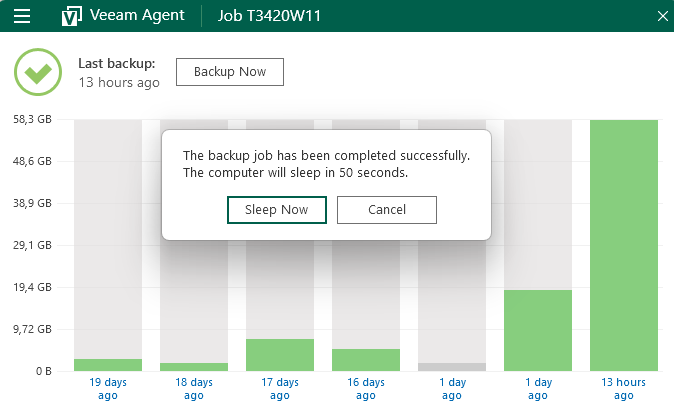
When I wake my computer and operate quickly to open Veeam Agent I can see stats like "backup completed 4 minutes ago" which then changes within seconds to something like "backup was done 12 hours ago". Then the sleep dialogue appears, warning me that the computer will be put to sleep within 90 seconds if I do not click cancel.
All this would be acceptable for the free version if it wasn't for:
a) If I don't login with 90 seconds the computer will go to sleep right after you turned it on.
b) The dialogue with the warning that Veeam Agent will put my computer in sleep mode opens *in the background* most of the time, if I do not start Veeam Agent manually I don't notice it. I must manually launch Veem agent to bring the dialogue to the front. Within 90 seconds.
Numerous times have I powered on the computer from sleep and started to use it only to be shut down by Veeam.
This isn't critical, and I use the free version but it is quite annoying and shouldn't be that hard to track down in the code?
Best Regards,
Niklas
Computer is in sleep, Veeam Agent wake up my computer at 00:30 from sleep to perform a scheduled backup. The computer goes to sleep after backup. Via Veeam setting in the backup job. I have disabled sleep completely in Windows 11 and I know from experience that the computer never sleeps via Windows built-in power saving. It is Veeam that puts my computer to sleep after performing a successfull backup.
When I wake my computer and operate quickly to open Veeam Agent I can see stats like "backup completed 4 minutes ago" which then changes within seconds to something like "backup was done 12 hours ago". Then the sleep dialogue appears, warning me that the computer will be put to sleep within 90 seconds if I do not click cancel.
All this would be acceptable for the free version if it wasn't for:
a) If I don't login with 90 seconds the computer will go to sleep right after you turned it on.
b) The dialogue with the warning that Veeam Agent will put my computer in sleep mode opens *in the background* most of the time, if I do not start Veeam Agent manually I don't notice it. I must manually launch Veem agent to bring the dialogue to the front. Within 90 seconds.
Numerous times have I powered on the computer from sleep and started to use it only to be shut down by Veeam.
This isn't critical, and I use the free version
but it is quite annoying and shouldn't be that hard to track down in the code?Best Regards,
Niklas
-
niklas
- Lurker
- Posts: 2
- Liked: never
- Joined: Jul 06, 2024 11:02 am
- Full Name: Niklas
- Contact:
Re: Veeam sleeps or reboots after login Window 11
Upgraded to 6.2. Veeam Agent (free) still wants to put my computer to sleep.
Once after successful backup + sleep and then
once when the computer is turned back on, some 12+ hours after the successful backup which put the computer sleep already.
This is so annoying, and would probably be easily fixed if just someone would care to look into this.
Once after successful backup + sleep and then
once when the computer is turned back on, some 12+ hours after the successful backup which put the computer sleep already.
This is so annoying, and would probably be easily fixed if just someone would care to look into this.
-
Mildur
- Product Manager
- Posts: 11832
- Liked: 3345 times
- Joined: May 13, 2017 4:51 pm
- Full Name: Fabian K.
- Location: Switzerland
- Contact:
Re: Veeam sleeps or reboots after login Window 11
Hi Niklas
Can you please open a case with customer support and let us know the case number?
Thank you,
Fabian
Can you please open a case with customer support and let us know the case number?
Thank you,
Fabian
Product Management Analyst @ Veeam Software
-
GChuck
- Influencer
- Posts: 10
- Liked: never
- Joined: Mar 02, 2022 5:18 pm
- Full Name: Greg
- Contact:
Re: Veeam sleeps or reboots after login Window 11
Fabian, as you can see, this issue has been going on now for over two years!
I'm now running Windows 11 23H2 (Build 22631.4317) and Veeam Windows Agent 6.2.0.121 Free Edition and am seeing this problem on both my Windows 11 computers, but don't see it on my old Windows 10 computer.
I did post a case number for this problem shortly after my originally reporting this problem. But that case died with no results or updates added.
Is it possible to see if this problem can be resolved!
Thank you
Greg
I'm now running Windows 11 23H2 (Build 22631.4317) and Veeam Windows Agent 6.2.0.121 Free Edition and am seeing this problem on both my Windows 11 computers, but don't see it on my old Windows 10 computer.
I did post a case number for this problem shortly after my originally reporting this problem. But that case died with no results or updates added.
Is it possible to see if this problem can be resolved!
Thank you
Greg
-
GChuck
- Influencer
- Posts: 10
- Liked: never
- Joined: Mar 02, 2022 5:18 pm
- Full Name: Greg
- Contact:
Re: Veeam sleeps or reboots after login Window 11
Has anybody found a way to fix this problem. It has been going on for 3 or 4 years now.
GChuck
GChuck
-
Ormek
- Lurker
- Posts: 1
- Liked: never
- Joined: Dec 26, 2025 8:41 am
- Full Name: Oliver Meyer
- Contact:
Re: Veeam sleeps or reboots after login Window 11
+1 I have a similar problem. I use wake-on-lan to start my computer, do the backup, shut down after backup. Worked fine with Windows 10.
Since I updated to Windows 11, I find my computer in sleep mode instead of off. If I wake the computer it will turn off. If I login in fast enough I see the dialog from the Veeam agent informing me about a shutdown.
I did not yet try to fix it. Will check on a fresh, non-updated windows 11 install.
Since I updated to Windows 11, I find my computer in sleep mode instead of off. If I wake the computer it will turn off. If I login in fast enough I see the dialog from the Veeam agent informing me about a shutdown.
I did not yet try to fix it. Will check on a fresh, non-updated windows 11 install.
-
Dima P.
- Product Manager
- Posts: 15049
- Liked: 1900 times
- Joined: Feb 04, 2013 2:07 pm
- Full Name: Dmitry Popov
- Location: Prague
- Contact:
Re: Veeam sleeps or reboots after login Window 11
Hello folks,
We've been trying to reproduce this issue with QA team but did not get a confirmation. If possible - please raise a support case and share the case id with us, logs would help us a lot. Thank you!
We've been trying to reproduce this issue with QA team but did not get a confirmation. If possible - please raise a support case and share the case id with us, logs would help us a lot. Thank you!
-
azpets
- Enthusiast
- Posts: 54
- Liked: 13 times
- Joined: Dec 05, 2020 4:08 pm
- Full Name: A.Z. SRL
- Contact:
Re: Veeam sleeps or reboots after login Window 11
Probably I'm totally wrong but I sense some "Modern Standby" issues. Among the buggiest plagues for Windows 11 laptop users.
I'd suggest who's having these problem to try the powershell/cmd command which disable hybernation and slower the resume/boot process, but also reduces SSD wear. On desktop is a command that I deliver in every system I configure.
I'd suggest who's having these problem to try the powershell/cmd command
Code: Select all
powercfg -h off-
GChuck
- Influencer
- Posts: 10
- Liked: never
- Joined: Mar 02, 2022 5:18 pm
- Full Name: Greg
- Contact:
Re: Veeam sleeps or reboots after login Window 11
I posted a case ID (05689197) back on October 24th, 2022 but that case died on the vine and was never heard from again until Niklas posted the same error on October26, 2024 (two years later)!
I'm still having the same problem, and now it is 2026. Don't get me wrong; I still love most things in Veeam; it does a great job of backing up my three computers to my file server and more importantly, allows me to do bare metal restores of my backups.
It's just the little things that seem not to always work and this one regarding waking up, backing up and then resuming sleep has been going on ever since I started using Windows 11.
To reiterate, I generally have three computers; two of which are running Windows 11 and one ancient machine still running Windows 10. All three machines have schedules set to wake them at around 4am, do their backups and then go back to sleep. The Windows 10 machine seems to do this flawlessly day in and day out. However both Windows 11 machines wake, do their backups and supposedly return to their sleep state. But when I first turn either machine on in the morning, the first thing that happens is I get a pop-up from Veeam that disappears to quickly to read and then the machine tries to go back to sleep!
I have now set the backup jobs on the two Win11 machines to NOT go back to sleep after they have completed their backups, but instead let Windows resume sleep after 1 hour or inactivity once the backup has completed.
One other strange thing about this that I also posted some time ago has to do with the time that the backup occurs. The Win10 machine does it's backup at 04:00, then the two Win11 machines do theirs at 04:15 and 04:30 respectively. I did this to lessen the chance of the backups overwhelming the server. The Win10 backup wakes exactly at 04:01 or so and does it's job. However the Win11 backup scheduled to run at 04:15 usually does not wake until 04:23 and the other machine scheduled to run at 04:30 does not wake until 04:38; both about 8 minutes late. This 8 minute lag I have never figured out, but it appears that if I work as I normally do from 05:00 till about 10:00, I get the 8 minute lag. But on those days when I work later; say to about 14:00, then the lag is shortened to between 4 and 6 minutes. In other words, the later in the day that I put the machines to sleep, the shorter the lag becomes.
Both Win11 machines are home built and based upon Z690 motherboards from different manufacturers (ASUS and Gigabyte), with either a Core i7-12700 or a Core i5-13500 cpu and both with 64GB or Corsair memory. On both motherboards I have tried to set their RTC Wake function to wake the machine at their respective backup time, but in both cases, this RTC Wake function does not appear to work. I have then contacted both manufactures with this problem and both basically never replied to my inquires. Not sure if this may be related or not, but thought I should include it.
I would be willing to work with you to resolve this problem If you wish.
One last thing. Over the past week or so, I have completely rebuilt both the Win10 machine and one of the Win11 machines. By rebuilt, I mean re-installing Windows from a newly downloaded ISO and then re-configuring it to have all my needed software reloaded. The Windows 10 machine was done so that I would have a clean install of the last Win11 ISO that MS offered and the Win11 machine so that I could upgrade from 24H2 to 25H2 cleanly.
On both of these machines I loaded the latest version of the Veeam Free Windows Agent (6.3.2.1302) and reconfigured them as before. And they still perform exactly as they did before. Win10 wakes on time, does the backup and sleeps; no issues. Win11 wakes late, does the backup and doesn't sleep and sends a fast paced message when I login and then goes to sleep.
If you need any further information, I would be more than happy to supply what I can. Like I said, I really like the product, but it's just the little nits that keep it from being great!
Thank you.
Greg
I'm still having the same problem, and now it is 2026. Don't get me wrong; I still love most things in Veeam; it does a great job of backing up my three computers to my file server and more importantly, allows me to do bare metal restores of my backups.
It's just the little things that seem not to always work and this one regarding waking up, backing up and then resuming sleep has been going on ever since I started using Windows 11.
To reiterate, I generally have three computers; two of which are running Windows 11 and one ancient machine still running Windows 10. All three machines have schedules set to wake them at around 4am, do their backups and then go back to sleep. The Windows 10 machine seems to do this flawlessly day in and day out. However both Windows 11 machines wake, do their backups and supposedly return to their sleep state. But when I first turn either machine on in the morning, the first thing that happens is I get a pop-up from Veeam that disappears to quickly to read and then the machine tries to go back to sleep!
I have now set the backup jobs on the two Win11 machines to NOT go back to sleep after they have completed their backups, but instead let Windows resume sleep after 1 hour or inactivity once the backup has completed.
One other strange thing about this that I also posted some time ago has to do with the time that the backup occurs. The Win10 machine does it's backup at 04:00, then the two Win11 machines do theirs at 04:15 and 04:30 respectively. I did this to lessen the chance of the backups overwhelming the server. The Win10 backup wakes exactly at 04:01 or so and does it's job. However the Win11 backup scheduled to run at 04:15 usually does not wake until 04:23 and the other machine scheduled to run at 04:30 does not wake until 04:38; both about 8 minutes late. This 8 minute lag I have never figured out, but it appears that if I work as I normally do from 05:00 till about 10:00, I get the 8 minute lag. But on those days when I work later; say to about 14:00, then the lag is shortened to between 4 and 6 minutes. In other words, the later in the day that I put the machines to sleep, the shorter the lag becomes.
Both Win11 machines are home built and based upon Z690 motherboards from different manufacturers (ASUS and Gigabyte), with either a Core i7-12700 or a Core i5-13500 cpu and both with 64GB or Corsair memory. On both motherboards I have tried to set their RTC Wake function to wake the machine at their respective backup time, but in both cases, this RTC Wake function does not appear to work. I have then contacted both manufactures with this problem and both basically never replied to my inquires. Not sure if this may be related or not, but thought I should include it.
I would be willing to work with you to resolve this problem If you wish.
One last thing. Over the past week or so, I have completely rebuilt both the Win10 machine and one of the Win11 machines. By rebuilt, I mean re-installing Windows from a newly downloaded ISO and then re-configuring it to have all my needed software reloaded. The Windows 10 machine was done so that I would have a clean install of the last Win11 ISO that MS offered and the Win11 machine so that I could upgrade from 24H2 to 25H2 cleanly.
On both of these machines I loaded the latest version of the Veeam Free Windows Agent (6.3.2.1302) and reconfigured them as before. And they still perform exactly as they did before. Win10 wakes on time, does the backup and sleeps; no issues. Win11 wakes late, does the backup and doesn't sleep and sends a fast paced message when I login and then goes to sleep.
If you need any further information, I would be more than happy to supply what I can. Like I said, I really like the product, but it's just the little nits that keep it from being great!
Thank you.
Greg
-
hundred
- Novice
- Posts: 3
- Liked: never
- Joined: Feb 03, 2026 2:28 am
- Full Name: Rondell Laronde
- Contact:
Re: Veeam sleeps or reboots after login Window 11
Changing the job option from go to sleep after the job is completed to keep running has made my computer go to sleep correctly and not prompt this second sleep timer anymore. My computer is set to never sleep so the job seems to have a sleep timer built in seperate from this setting.
Who is online
Users browsing this forum: No registered users and 230 guests